



Google Chrome is now addressing the need for ad regulation online with one of their initiatives. Chrome will now be able to detect and shutdown resource-heavy ads, which take up your device’s resources, drain your battery life and use up data.
This comes in the form of a blog post from Marshall Vale, a product manager at Chrome who details the new ‘feature’. The browser will now limit the resources a display ad can use before the user interacts with the ad. When an ad reaches its limit, the ad’s frame will navigate to an error page, informing the user that the ad has used too many resources. Here’s how it would look:

While it doesn’t function the same as an ad-blocker, I feel this would definitely be great for mobile. If these ads are consuming your phone’s data, battery, and making your phone work overtime just to load them, you should see an increase in performance overtime.
Google does mention that they’ll be targeting ads that use 4MB of network data or 15 seconds of CPU usage in any 30-second period or 60 seconds of total CPU usage.
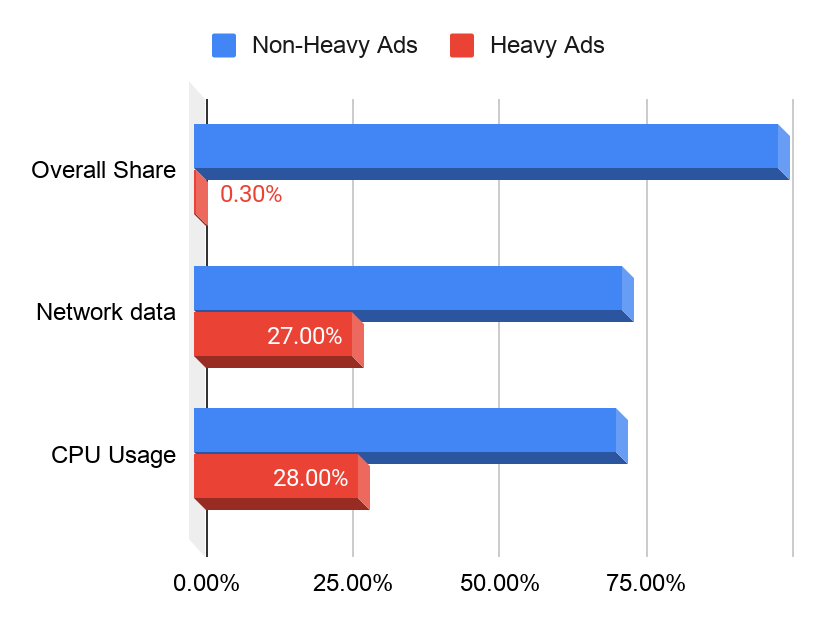
However, Vale also adds that only 0.3 percent of ads exceed this threshold today, but it accounts for 27 percent of network data used by ads and 28 percent of all ad CPU usage. For now, they’ll be experimenting over the coming months and will launch this “intervention” on Chrome near the end of August.
Here’s how to get it:
Of course, some of you might be clamoring to try it out so here’s how. All you have to do is:
- Copy paste “chrome://flags/ #enable-heavy-ad-intervention” into your Chrome browser and hit enter.
- ‘Heavy Ad Intervention’ will be the first toggle.
- Change it from ‘Default’ to ‘Enabled’
And that’s pretty much it. Let us know in the comments if you’re gonna be trying out Chrome’s latest feature, and if it increased your device’s performance in anyway!





