IBM found a malicious file distributed on USB flash drives used in the initialisation tool for IBM Storwize V3500, V3700 and V5000 Gen 1 systems.
When the initialisation tool is launched from the USB flash drive, the tool copies itself to a temporary folder on the hard drive of the desktop or laptop during normal operation, along with the malicious file. The silver lining is, the file doesn’t execute during that process.
The USB looks like this:
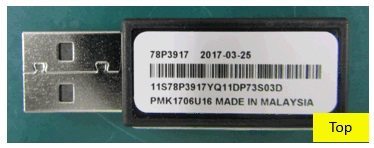
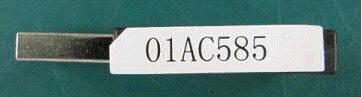
According to IBM, the Initialization Tool on the USB flash drive with the partnumber 01AC585 that shipped with the following System models may have an infected file:
- IBM Storwize V3500 – 2071 models 02A and 10A
- IBM Storwize V3700 – 2072 models 12C, 24C and 2DC
- IBM Storwize V5000 – 2077 models 12C and 24C
- IBM Storwize V5000 – 2078 models 12C and 24C
IBM Storwize Systems with serial numbers starting with the characters 78D2 are not affected.
IBM notes that the Storwize storage systems nor data stored on these systems are infected by this malicious code. IBM has stopped additional USB flash drives being shipped with this issue.
IBM recommends customers who has initialised the system to verify that their antivirus software has removed the infected file, or manually remove the directory containing the identified malicious file by deleting the temporary directory.
- On Windows systems: %TMP%initTool
- On Linux and Mac systems: /tmp/initTool
In addition for Windows systems, ensure the entire directory is deleted (not moved to the Recycle Bin folder). This can be accomplished by selecting the directory and Shift->Right-click->Delete the directory.
For customers who hasn’t used the drive for installation, IBM suggests:
- Securely destroy the USB flash drive so that it can not be reused.
- Repair the USB flash drive so it can be reused:Delete the folder called InitTool on the USB flash drive which will delete the folder and all the files inside.If using a Windows machine, holding down shift when deleting the folder will ensure that the files are permanently deleted rather than being copied to the recycle bin.
- Download the Initialization tool package from FixCentral https://www.ibm.com/support/fixcentral.
- Unzip the package onto the USB flash drive.
- Manually scan the USB flash drive with antivirus software.
IBM recommends ensuring your antivirus products are updated, configured to scan temporary directories, and issues identified by the antivirus product are addressed.
More details are on the advisory by IBM.