



Let’s be honest: nobody expected the GALAXY Note series to do this well. Initially, I just thought it was just a larger run-of-the-mill smartphone with a stylus included, but Samsung decided to run with this concept, bringing the GALAXY Note 2, 10.1, and 8.0 to consumers worldwide. And with each refined release, I grow slightly fonder of the product line. I’m happy for the appearance of Wacom here with its digitiser technology as it makes the device a viable artist’s tool. With its second 10in GALAXY Note, is the new 2014 Edition enough to make me a devout convert? Read on to find out.
Black or White
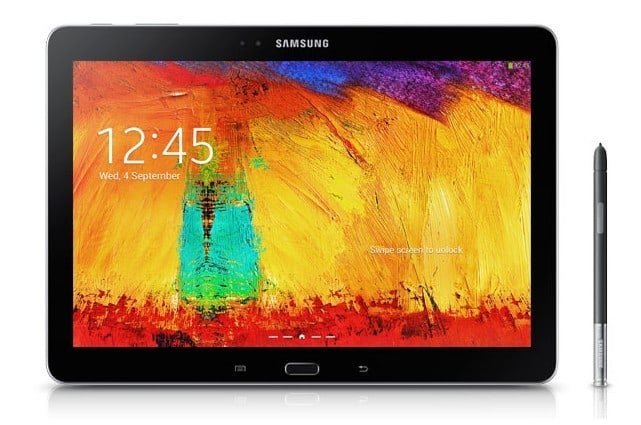
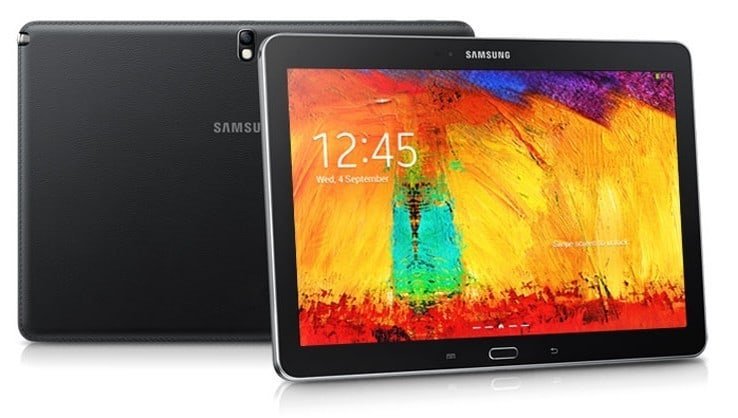
As the original GALAXY Note 10.1 followed the design aesthetic of the GALAXY Note 2, the 2014 Edition follows the GALAXY Note 3. Gone is the “curved pebble” look of previous Samsung devices. Available in black or white, the GALAXY Note 10.1 2014 Edition (long name, right?) adopts the same ridged chrome trim and faux-leather backing found in its 5.7in sibling. The back is a definite improvement over the glossy plastic found on predecessors, though I can do without the leather texture. Personally, I miss the metal back of the GALAXY Tab 7.7, and I hope Samsung brings that back for their future devices.
What a Sight!
The GALAXY Note 10.1 2014 Edition has a display that has an absurd 2560 x 1600 pixels, similar to Samsung’s venture with Google, the Nexus 10. In comparison, the original GALAXY Note 10.1 only carried with it 1280 x 800 pixels. With the increased resolution, you get sharper text, images and icons. You will definitely appreciate the display once you get to multitasking and its related activities.
Come Out, Come Out
As with all GALAXY Note devices, the S Pen returns as well – this time in the 2014 Edition. It looks exactly like the one used with the GALAXY Note 3. They may be, from the looks of it, interchangeable. I believe that the S Pen would be better used on the 10.1in slate simply because of the extra working area afforded by the screen size. I don’t know about you, but 5.7in simply is a little too cramped for me to use the S Pen.
Windows Everywhere
Don’t worry, I’m not talking about that operating system. Instead, I’m writing about the Air Window and Multi Window features that the new GALAXY Note 10.1 offers. The Multi Window feature, as you can guess, allows for two apps to run side-by-side. This lets you transfer content from one app to another without fumbling through the Task Manager. Things appear smoother this time round, with nigh-seamless transitioning, no doubt due to the powerful innards. That said, I am absolutely digging Pen Window. You start by choosing the feature out of the Air Command menu, draw a rectangle/square, and you choose what app you want to open. The app then appears in a miniature window that stays on top. The app selection is limited to Samsung’s own apps and YouTube, but on the plus side, you get to watch YouTube videos while you work! Neat, huh?
Sketchbook is In!
What I am about to write is going to please artists everywhere: the GALAXY Note 10.1 (2014 Edition) comes with Autodesk Sketchbook Pro. Yes, it appears under a different name (Sketchbook for Galaxy), but it looks and feels exactly like the popular tablet sketching app. It does not come pre-installed and requires a separate download but once you install it, you just pop out the S Pen and let your imagination go wild.
Time to Run
Now we proceed to the innards. The GALAXY Note 10.1 (2014 Edition) has a 2.3GHz quad-core Snapdragon 800 processor ticking within, paired with 3GB of RAM. Local variants come with a generous 32GB of storage, with 6GB reserved for the system. A microSD slot facilitates storage expansion, supporting up to 64GB of extra space. Also, local variants have a SIM slot with LTE connectivity. I’m guessing that you will be needing the speedy connection and extra space because you will want content that will look amazing on that display, which in turn will have increased storage requirements. The tablet runs Android 4.3 with Samsung’s own Touchwiz interface on top.
Not So Fast, Buster
Despite the speedy parts, I did encounter some minor sluggish-ness when navigating the TouchWiz interface. It does not come as surprise as the interface now has My Magazine, an aggregator of news feeds all around the world, as well as updates from your social media accounts. The higher screen resolution also requires more processing power, hence it not scrolling as smoothly as one expects. However, the tablet absolutely aced it in the other departments: the speakers are loud and clear, videos, text and images appear sharp and vibrant on the glorious display (you know the climactic battle in Iron Man 3? It looks awesome!), and the S Pen works just like it should. Maybe I should go out and buy one…
Price: RM 2,299
Dimensions: 243.1 x 171.4 x 7.9mm
Weight: 535g
Display: 10.1in, 2560 x 1600 pixels
Processor: 2.3GHz quad-core Snapdragon 800
Memory: 3GB
Storage: 32GB, expandable via microSD
Operating System: Android 4.3 Jelly Bean
Battery: 8,220mAh
AnTuTu Benchmark: 34255
3DMark (Ice Storm Unlimited): 14960
Value: 8/10
Features: 9/10
Performance: 9/10
Design: 9/10
Usability: 9/10
Verdict: Fellow artists, this is your new weapon of choice.
Total Score: 8.8/10





