True Gaming Essence
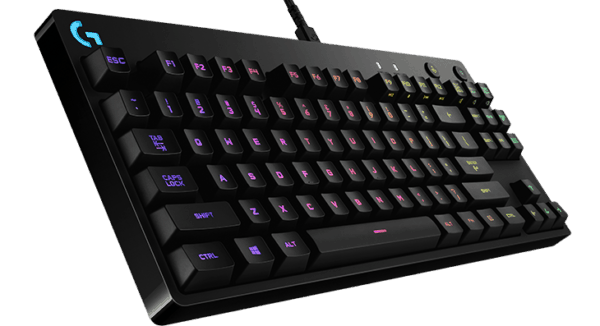
Another popular gaming brand that needs no introduction, Logitech has found itself being a household name in the gaming peripherals industry. Take the Logitech G Pro gaming keyboard for example. It’s hard plastic body coated in black features only the core essentials of the keyboard, leaving out the numpad entirely. Unless you’re an accountant and a gamer (my hats off to you good sir), it’s highly unlikely you will find use for the numpad. It’s like how Malaysians view the turn signal; we know it’s there but we never actually use it.
With the numpad excluded, this frees up table space for more mouse movement. It also makes transporting the Logitech G Pro to and from tournaments with very little hassle. It’s also highly durable as there is a steel backplate reinforced into the keyboard. A perfect choice for the ragers, this gives the Logitech G Pro an edge as you can smash your fist on it repeatedly without breaking it (although I highly recommend against it.)
Doesn’t Taste like Cherry
Keyboard aficionados would almost always swear by their Cherry MX switches. The same can’t be said when it comes to Logitech gaming keyboards as the G Pro features Logitech’s very own Romer-G mechanical switches with a lifespan of up to 70 million clicks. Oddly enough, the switches on the Logitech G Pro reminds me of the Cherry MX Brown switches, from the slightly audible click to having a soft tactile feedback. This was slightly infuriating as I kept thinking it’s actual Cherry MX switches, only to realise it wasn’t.
A Useful Ally
However, the Logitech G Pro can perform better than ever, given the chance. It was exceptionally reliable during intense teamfights in Dota 2 as the keys were responsive to my every click and touch. Although you might worry about pressing the wrong keys at the wrong moment, Logitech helps you out in that department with its Logitech Gaming Software.
Through the program, you can customise various profiles on different games to ensure certain keys stay locked and unresponsive to not make it counter-productive. Logitech also makes it easier for you by placing a shortcut button on the top right corner of the keyboard so you can easily switch the desired profile on or off whenever you want. For MMO and RTS gamers, you can setup commands on various keys to give you an edge when it comes to dishing out combo after combo.
Not Another RGB Gaming Keyboard
It’s inevitable; RGB is literally everywhere these days. If you’re wondering on how to add a little colour with the Logitech G Pro, you can do all that through the Logitech Gaming Software program. Sadly, it doesn’t offer much choices in terms of lighting modes. What I do enjoy about Logitech is the addition of the Lighting button on the top right corner of the keyboard. If you’re sick of looking at the lighting, you can switch it off without having to manually do it through the program.
Multi-functional Cable
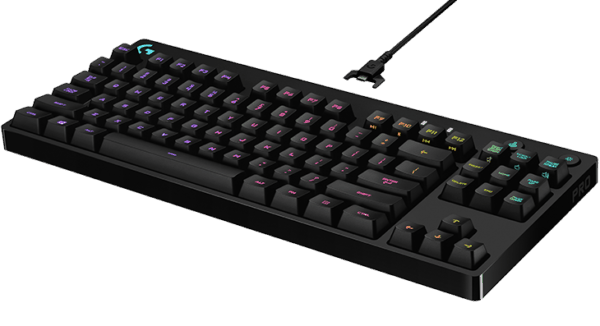
The braided USB 2.0 cable for the Logitech G Pro stands at six feet long and can be easily detached to ensure it stays up to par when you’re on-the-go. Suited for professional gamers who are constantly moving from different tournaments, the micro USB connector comes with a three-pronged design to give it added durability while it’s easy detachment makes it easy to setup. A plus point for the USB cable is its versatility; if you’re using the Logitech G900 or G403 wireless gaming mouse, you can easily hook them up to the cable and charge away.
Verdict:
Although RM629 is a steep price to pay for a gaming keyboard, you cannot go wrong with its performance and portability.