



Editor Review
Byline: By Victor Yap
When I got word that Microsoft Malaysia is sending over the Surface Pro 3 (SP3) for review, I had this gut feeling that told me of how the idea I had been bouncing around seemed very appropriate now. Perhaps it’s the timing since I had always wanted to do a long-form review but not many gadgets that I manage to get seemed worthy of the time and effort spent. Not one device tickled that need…until the SP3 showed up.
Having done a two-page review of the SP3 last month, I thought the urge to pen my comprehensive experience had been dealt with. Seeing as how I only scratched the surface further re-ignited the drive to really consider a long-form platform to share all that I had encountered while using Microsoft’s new Surface entry. Really, what else can I say about this PC.com Perfect 10 winner?
Well, without further ado, let us get into the thick of things with PC.com’s inaugural Editor’s Review!
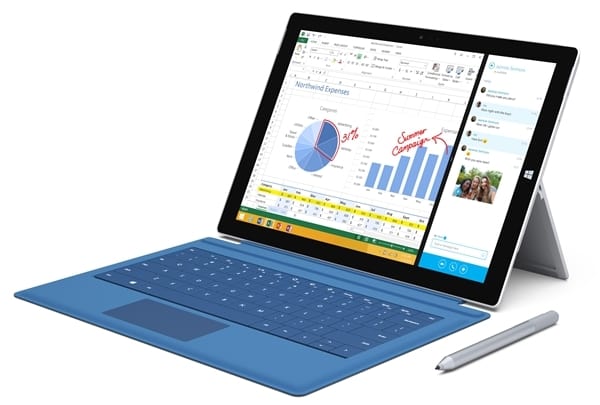
Design: Great Looker
In my attempt to avoid repeating myself from the September review of the SP3, I won’t say beyond this one line: amazingly slim and exceptionally classy. Wherever I go with the new Surface, heads turn and eyebrows raise in wonder at what I had in my hand. This 12in metal slate, on its own, is no taller than my writing textpad (just a tad shorter than an A4 paper) yet it commands the attention of the room/area I’m happen to be in. Now that’s real presence!
Docked: Subtly Stylish
When paired with the Touch/Type Keyboard, now in its third iteration as well, the level of attention drops slightly as the keyboard, when closed up onto the SP3, makes it literally look like a text-based notebook. The similarity is odd but I guess when you want to hide the SP3 in plain sight, this subtle approach works. I like that this ‘notebook’ form factor allows me to conveniently ‘grab-and-go’ the tablet when I’m in a hurry. Upon being set to desktop mode, it became very, VERY attractive to those in its vicinity. Thus, I can confirm that there is a keen sense of interest and admiration when I take out the SP3 to perform some writing work.

Display: Truly Vibrant
A great chassis must come with an excellent performing display. In the case of the SP3, the 12in ClearType Full HD Plus screen is extremely sharp. This is thanks to the 2160 x 1440 pixel resolution that it uses. Complementing the sharp visuals is, of course, the bright and rich hues that the SP3 screen produces. The primary shades look great with the whites and blacks sporting a nice balance. I like how deep the blacks look, which gives the other colours a richer saturation.
Specs: Packed Performance
While there are many SP3 variants, the one I have in my hands is rocking an Intel Core i5-4300U 1.90GHz CPU, 8GB RAM, and 256GB of storage space. All that translates to an ultra-smooth and lag-free user experience that is near unparalleled. The only other systems that can match the new Surface entry in terms of speed and performance prowess are gaming notebooks, high-end business workstations, and performance-type PCs. Is it really that good? Certainly, especially since I’m the sort that leaves a tonne of tabs open on my browser. In fact, I used both Google Chrome and Internet Explorer 11 on the SP3 with more than 20 tabs open per browser and I’ve yet to encounter any slowdown whatsoever. Even a varied number of YouTube streams did nothing to disrupt the overall performance or user experience.
Capability: Real Workhorse
Thank goodness someone in Microsoft Malaysia keeps tabs on the work I do as the SP3 that had been sent over comes paired with the Type Cover 3 keyboard. This automatically tells me that the device is all set for work and that it means business. Suffice to say, I got most of my writing done on the SP3 ever since it arrived and I’ve not been keen to switch back to any of the gaming systems that are sitting in the cabinet now. This is due to the combination of the Type Cover that came in with the SP3, the 10-point touchscreen that the device offers, and SP3 digitiser stylus, all of which make the user experience really seamless, intuitive, and fun.Of course, it is more than ready to take on some games as well though I am pretty sure it is not designed to deal with titles that have heavy graphic demands. The downer for such a great device is the lack of USB 3.0 ports as there is only one…just one!?
Keyboard: Typing Wonder
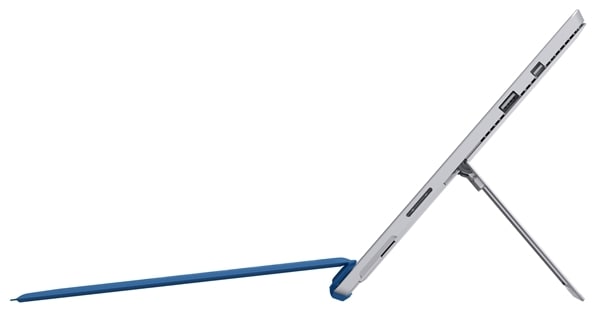
When it comes to typing on the SP3 with the Type Cover 3, it feels like I’m using a Chiclet keyboard that Ultrabooks, 2-in-1s, and ultra-thin form factors that are known to carry. In fact, most times, the Type Cover performs better than the Chiclet design as it has a spacious keys (!), roomy key travel, and better tactile feedback. What else would I need? But wait…what if I didn’t bring the keyboard with me? Well, there is the software-based keyboard (gasp!) No really, it’s pretty decent, especially since I’m typing on a 12in screen. The larger screen real estate means more space to manage and having proper headroom above the embedded keyboard for me to see what I am working on.
Stylus: Useful yet Easily Misplaced
The SP3 stylus has received some major upgrades as part of the improvements that Microsoft has introduced for the new Surface. In terms of design, it is no longer just an ordinary stylus as the writing tool is now perpetually linked to Microsoft OneNote. Clicking the top of the ‘pen’ will open OneNote and allow you to jot down details in quick order. Of course, this is after you power up the stylus, ala provided one AAA and a pair of CRC batteries, and sync it via Bluetooth to the SP3. Writing with the stylus feels very natural with only the odd feeling of a smooth surface beneath. However, if I had to choose between writing and typing, I’d go for the latter as it’s more seamless to fire up Microsoft Word and start punching out the details. If you ask me, the stylus – while a great tool, is pretty secondary when it comes to engaging the SP3. Plus it cannot be stored on the SP3 as Microsoft expects users to slip the writing tool onto the provided nook of the Type Cover or magnetically ‘dock’ it to the power port area of the new Surface. Smart…yet not so as I can potentially lose the stylus in a very unknowing fashion.
Speakers: Sound Check
The sound system of the SP3 – a decent 2.0 channel speaker array, is pretty loud. On max volume, there is a slight distortion at the mids and highs while bass did not have any cracks. As a result, classical chamber music, gunfire, jet roar, rock concerts, and courtroom drama sounded a little too sharp for my liking while jazz, bass beats, cannon reports, crashing waves, and epic sword/shield battles came out perfect! Well, I guess you can’t have everything.
Power: Day-Long
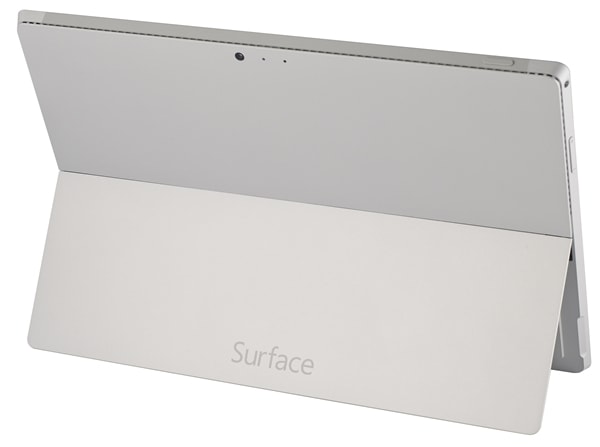
All that high-end performance sounds like it takes a huge chunk from the battery. Based on my extensive tests, such notions are very far from the truth. On average, I managed to last six to eight hours on a single charge. That translates to, more or less, a full day of work. This is with me doing work, streaming on YouTube, and occasionally checking out social media. If I turn on Spotify or Winamp, the battery drain is slightly higher as I managed six hours at best before the battery meter dipped below 5%.
Temperature: Runs Hot
I have only one complaint throughout my review of the SP3 – the heat dissipation. Overall, it does the job and the device runs cool but one section will remain constantly and consistently warm. Specifically, it is the top right of the metal case, where, I suspect, is the location of Wi-Fi module or CPU. I’ve turned on Hyper-V (a move I really do not recommend as it doubles the battery drain) to gain High Performance mode in the battery settings. I do this only for benchmark testing. It is during this phase of the review that I found out how the toasty zone of the SP3 became a hotplate that got off the stove. Something to take note off and be careful with.
Overall: Take My Money
While I do have some qualms about the SP3 like having only one USB 3.0 port, the device running really hot at crunch times, being bundled with the occasionally useful stylus that has the tendency to go lost if not tracked properly, and offering a mixed audio performance, all the other advance functions and features more than make up for what is lacking. It is the perfect workhorse for those who are always on-the-go and constantly need a reliable and high performing device at their side. It helps that the screen size has ramped up to 12in, making the orientation and hand-device control feel very much like holding a handy diary or notebook. This is why it deserves the PC.com Perfect 10 rating and my long lasting love!
Dimensions (W x H x D): 292.1 x 201.4 x 9.1mm
Weight: 800g
Display: 12in ClearType Full HD Plus, 2160 x 1440 Multi-Touch
CPU: 4th Generation Intel Core (up to i7)
RAM: 8GB DDR3
Graphics: Intel HD Graphics 4400
Storage: 256GB SSD (Up to 512GB)
OS: Windows 8.1
Network: Wi-Fi 802.11a/b/g/n/ac, Bluetooth 4.0 with Low Energy Technology
Camera: 5.0MP Rear-Facing Camera, 5.0MP Front-Facing Camera
Speakers: Stereo Set with Dolby Sound
I/O: 1x USB 3.0, 1x microSD Slot, 1x Mini DisplayPort, 1x Headseat Jack, 1x Cover Port
PCMark 8: 2288 (Home), 2267 (Creative), 2278 (Work)





