


 One thing that we’ve learnt as the coronavirus pandemic rages on is just how gross some of us are. Now, many of us wash our hands constantly, sanitise your hands, wipe down surfaces in and around your home or office. But one thing you have in your pocket right now might have never been properly cleaned. It’s important to practice being hygienic and self-sanitisation, especially now, and especially on your smartphones.
Samsung have chronicled in a blog post some tips to help keep your devices clean and safe. But before that, let’s consider the stats for a second here. You might question why you would even need to clean your smartphone, so here’s why:
Why Do You Need to Clean Your Smartphone?
According to a study by global consultancy firm Deloitte, American users view their smartphones around 14 billion times a day, with each individual user picking up their phone 52 times a day on average. As we enter a phase of telecommuting and remote communication, these numbers are only set to increase.
“Our studies show us that viruses can survive on plastic or metal surfaces for up to 2 or 3 days,” highlights Dr. Doo-Ryeon Chung, Director of Center for Infection Prevention and Control at Samsung Medical Center.
“In order to use your smartphone safely, it is imperative that you keep your device clean.”
Smartphone Hygiene
Samsung chronicled these steps of course, to apply to their own Galaxy smartphones. But, I figure if Samsung endorses these methods of cleaning for their phones, you should be good as well. However, to save my own a**, here’s the clichéd “Proceed at your own risk” warning.
Samsung firstly mentions not to use general cleaners, compressed air sprays or disinfectant and bleach-based products. Using these solutions can peel off or damage the oleophobic coating layer over the smartphone’s display which helps stop fingerprint smudging.
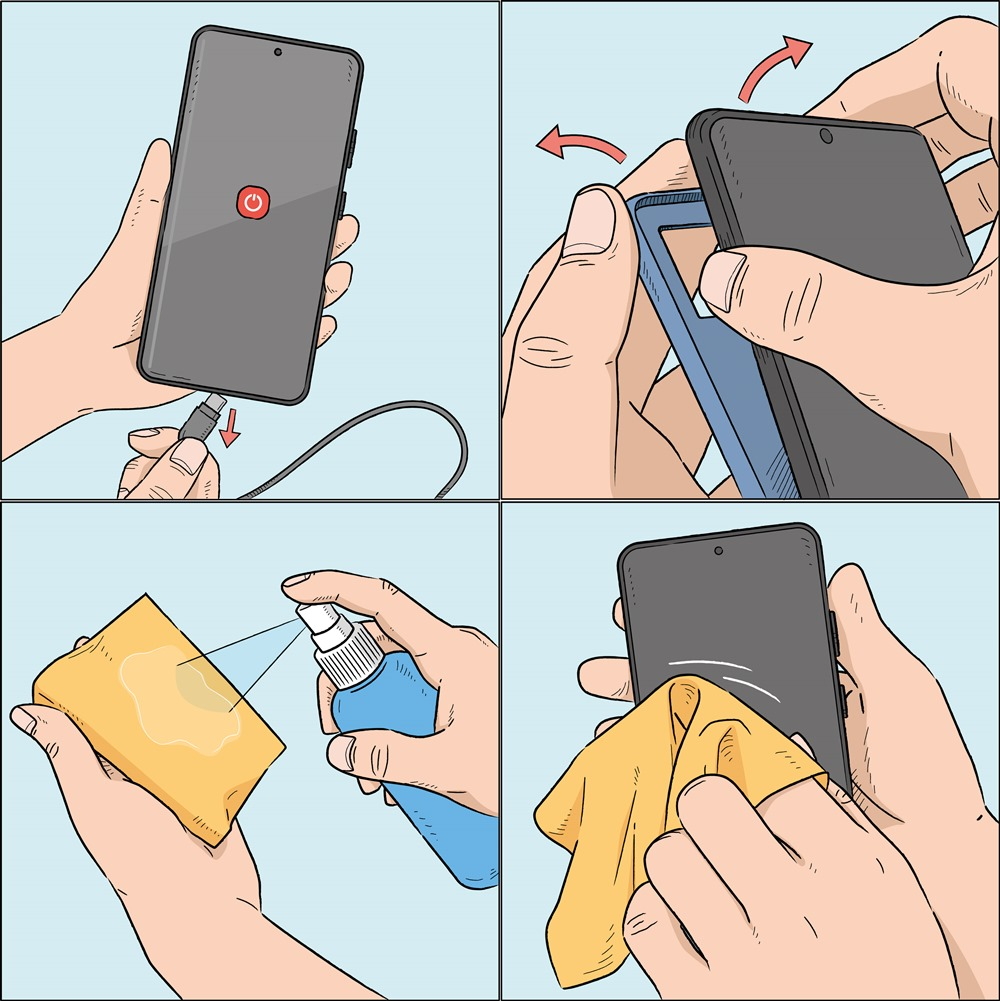
They go on to mention to fully powered down your device, remove the case, cables and other accessories attached to the smartphone. Use a lint-free microfiber cloth to wipe down the exterior of the device.
You can also add in a small amount of distilled water or disinfectant, such as a hypochlorous acid-based (50-80ppm) or alcohol-based (over 70 percent ethanol or isopropyl alcohol) product. But of course, do not apply this directly to your phone or smart device, and put it onto the microfiber cloth. This will help to avoid liquid seeping into the phone’s openings.
Dampen the cloth with disinfectant and gently wipe the front and back of your device to cleanse it.
HOWEVER, keep in mind these disinfection methods should be avoided for leather or rubber surfaces. This is suitable for glass, ceramic and metal surfaces.





