




Google has launched its new Chrome 46 and with it, comes a few changes. One of which concerns web security. On Chrome 45, you might have noticed that there are 3 states of security;
- 100% secure HTTPS site displays a green lock icon.
- Broken sites show a red ‘X’ symbol.
- Websites that try to use HTTPS but have some minor errors will show a yellow ‘caution triangle.’
However, the new version of Chrome will mark the last type of websites, the ones with yellow triangle, using the same neutral page icon as HTTP pages.
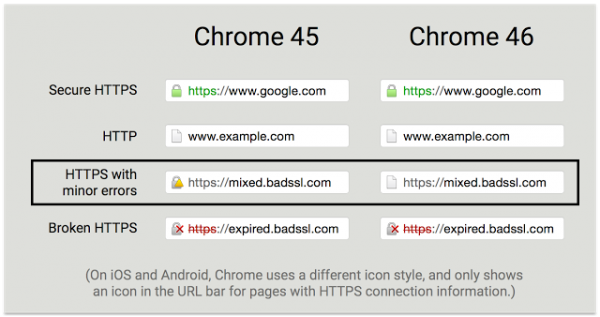
Google states its reasons being better indication of the security state relative to HTTP pages and fewer security states for users to learn.
Google further explains: “Site operators face a dilemma: Switching an HTTP site to HTTPS can initially result in mixed content, which is undesirable in the long term but important for debugging the migration. During this process the site may not be fully secured, but it will usually not be less secure than before.”

The hope is users will not be warned off these sites and this will encourage more sites to switch to HTTPS sooner than later. In the long run, Google plans on reducing the security states to only two; secure and not secure. Therefore, it will have to reach a certain quota of secure sites in order to realise this.





