


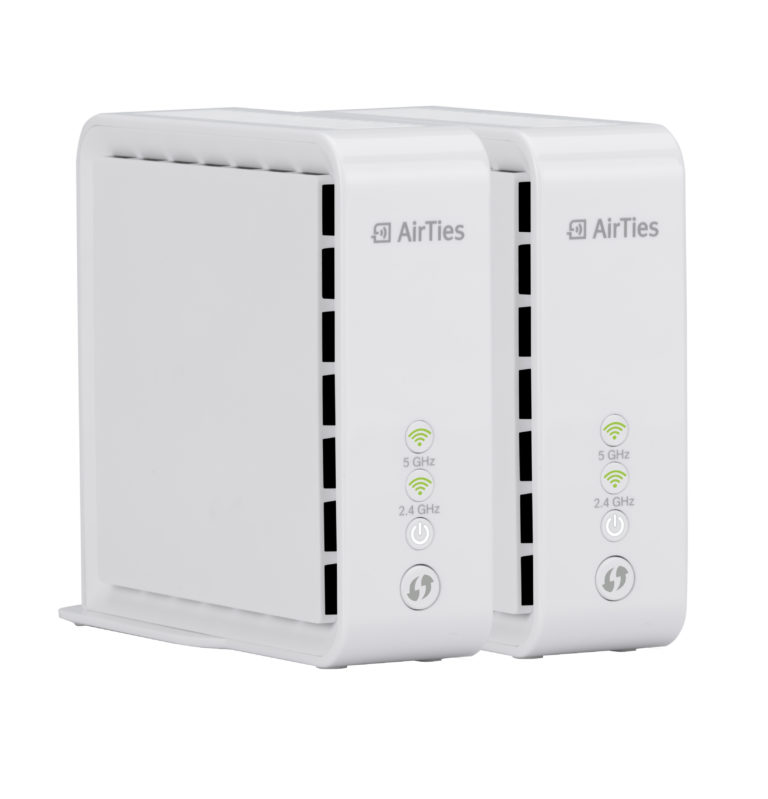

As the application of IoT, smart devices and mobile technology continue to exponentially increase everyday become more widespread, the demand for high-speed, stable wi-fi has never been greater. This is mainly because wi-fi allows users to be mobile, whilst being hooked up to the internet. Therefore, with the ever-increasing demand for stable, high speed wi-fi, manufacturers have been diligent in producing wireless routers and extenders to satisfy this demand, and the latest iteration of this is known as mesh wi-fi.
Mesh wi-fi stems from the word mesh, and it essentially creates a mesh-like network between them, allowing for better wi-fi coverage; even in blind spots which are unavailable to conventional routers. For the purpose of this review, we’ll be talking about the AirTies Air 4830.
Unboxing Experience
Unboxing the Air 4830 is a simple and a relatively hassle-free process. The box consists of 2 tiers; an upper tier which houses the main extender unit, and a lower tier, which has an ethernet cable, the AC adapter, the quick installation booklet, and the safety instructions. The length of the power chord was immediately identified as an area for improvement, which could have been as long as the ethernet cable; increasing mobility.
Setup

Setting up the Air 4830 is relatively straightforward and almost as effortless as its unboxing. One of the Air 4830’s has to be permanently connected to your router via ethernet, where it will automatically receive the signals and configuration of the network from the router. The second unit can then be placed anywhere without the need for a wired connection.
However, AirTies recommends a maximum of two walls in between each node for optimal performance. To complete the setup of the Air 4830, the AirTiesWifi app is required, and can be downloaded from Google Play (Android) or the Play Store (iOS). After setting up the nodes, the app could be used to monitor the connections, and the positions of the nodes can be changed easily to achieve a desired connection.
Performance
Prior to using the Air 4830, a regular Asus wireless router was used to transmit wi-fi across a 2-story house an area of about 2,000 square feet. However, devices on the 1st floor suffered from an unstable and slow internet connection. Moreover, certain Wi-Fi blind-spots resulted in an even worse connection. Therefore, an Air 4830 was connected to the router upstairs, and another was placed downstairs. On a side note, depending on the speed of your connection, the Air 4830 is able to transmit up to 2000 Mbps of data concurrently. The three rooms were averaging 25Mbps without the mesh Wi-Fi system, and only with one router connected across.

However, after connecting the Air 4830, there was a substantial increase of both download and upload speeds with the mesh system. This resulted in an average of 93Mbps for download speeds across all three rooms, and an average of 98Mbps for upload speeds in the same rooms.
Furthermore, it can also be noted that the upload/download speeds remained pretty much constant in all 3 rooms. This is because the nodes utilize AirTies Client Steering Technology to intelligently decide the best access point for each device, while optimizing performance.
Therefore, a user could be moving to different areas, and the Air 4830 will work to ensure a constant and optimal wi-fi performance at all times. Moreover, the Air 4830 concurrently transmits data on 2.4GHz and 5GHz, ensuring that all devices, both older and newer receive premium level wi-fi. It is also worth knowing that the Air 4830 is compliant with 802.11b, 802.11g, 802.11a, 802.11n, 802.11ac, 802.11d, 802.11h, 802.11e, and 802.11i standards. 
Pro’s
- Small size
With a relatively small footprint of 100mm (h) x 108.4mm (D) x 41.5 mm (W), each Air A4830 can be tucked in a corner so users will be able to enjoy premium wi-fi while maintain a clean, minimalistic setup.
- Ease of Setup
As mentioned above, setting up this device is extremely simple. Once the nodes are powered on and the power lights are stable, they can be paired by simply pressing the WPS button on both the nodes. The 2.4 and 5Ghz LEDs will flash as the nodes are pairing, and the process should be complete within 10 minutes, depending on the distance of the nodes from each other.

Final Thoughts
Taking into account the aesthetics, features and performance, I would recommend the AirTies A4830 to anyone who would want to try mesh wi-fi. Although it is slightly more expensive than some other mesh systems on the market, a combination of its ease of setup, its performance, features, and its size earns it a recommendation.






One Response
90+ Mbps download and upload? Are you sure? Even the normal AC wifi can get 200+ Mbps. Are you sure the unit, Mbps? Do you know that Mbps and MBps are different? Anyway, “just an OK” review, feedback from a network specialist. The “just an OK” is only because you managed to highlight that the second unit does not have ethernet port; it connect wirelessly with the other unit. Thanks, because of your review, I’ll no longer consider Maxis Fibre.