


The best bang for your buck.
Asus has been in the ultrabook category along with its competitors for quite a while now with their Zenbook series. If you think the MacBooks look sleek, the Zenbook is even sleeker and Asus is constantly perfecting the Zenbook series to make it standout better with the simplest design.
Design
The Asus Zenbook UX433F has a chassis of a 13-inch notebook but don’t be surprised to see a 14-inch screen fitted to it. It is a trend most companies are adapting to have a smaller footprint but a bigger screen. This is achieved using an extremely slim bezel giving the laptop an almost frameless design. Our unit is finished in Icicle Silver which makes this ultrabook look premium. There are some rose gold accents on the ASUS emblem and a strip running just above the keyboard giving it a nicer touch to the already premium looking notebook.
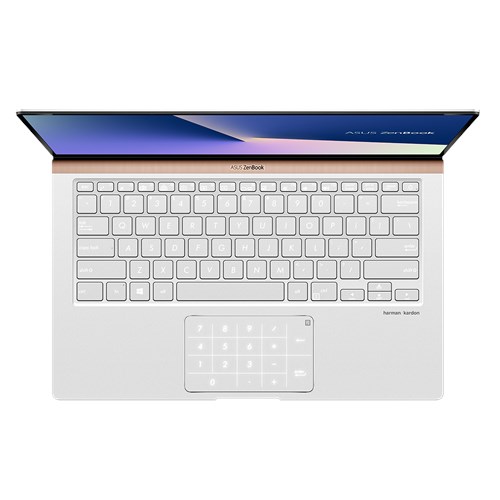

Just by the touch of a finger, you can already tell that most parts of the chassis is built from a high quality aluminium. There is very minimal chassis flex and the use of glass on the display makes it even more rigid. Speaking of glass, the touchpad on the Zenbook also uses glass and there is a reason to that. On the top right corner of the touchpad, there is an indicator which denotes that of a numeric keypad. Touch and hold on this indicator for a second and the whole touchpad transforms into a numeric pad. Pretty cool don’t you think? Of course, Asus isn’t the first or the only one to do this.
The keyboard has pretty decent size keys and they are laid out perfectly to type. However, the function keys although they are meant to be mapped onto the “F” keys, it may get in the way when using it sometimes. Key travel on this keyboard is deep enough to give a satisfying click but the retention is a little hard which requires a little more effort than typing on other keyboards. The keyboard is backlit with three levels of brightness.
Lifting open the lid is so effortless that you don’t need to use both hands for it. The hinge isn’t too stiff or soft which makes it easier to open the lid using just a finger without lifting the entire notebook. Moreover, the notebook lifts up a little at 3-degree angle giving it some clearance below the notebook for better airflow and a comfortable typing position. Asus fitted a pair of Harman/Kardon speakers underneath the notebook which gives an outstanding audio experience. Unfortunately, no fingerprint scanner can be found on this notebook but there is a 3D infrared camera which can be used to login.
Performance
The Zenbook 14 we tested runs on the latest 8th Generation Intel i5-8265U quad core processor with a base clock speed 1.6GHz with Turbo Boost up to 3.9GHz. It comes with a 512GB PCIe SSD storage paired with 8GB 2133MHz LPDDR3 RAM. This particular model is fitted with NVIDIA GeForce MX150 discrete graphics which should be sufficient to render videos or play games at a decent performance. There is a USB 3.1 Gen 2 Type-C, a USB 3.1 Type-A, a USB 2.0 Type-A, an HDMI port and a MicroSD card reader.
| PCMark 10 | 3450 |
| 3DMark 10 | 942 |
From the benchmark results, it is pretty clear that this notebook is not designed for games. However, if you still insist on gaming, it is recommended to game in low settings to get a decent frame rate. The Zenbook 14 can be configured to have the latest 8th Generation Intel i7 processor, up to 16GB of RAM and 1TB of PCIe SSD storage.
User Experience
There are a few different ways you can secure your device from anonymous login attempts and people often choose to use the fingerprint scanner (if fitted) as it is the most convenient way. However, this Zenbook doesn’t come with a fingerprint scanner but instead; it comes with a face recognition feature using the 3D IR camera. Questions do rise as to how secure is this login method. Nevertheless, setting up the face recognition unlock feature on this notebook is very easy and only takes seconds. Also, it recognizes the face pretty quick and brings you straight to the desktop. If this doesn’t happen to you, do check the settings and make sure to enable the “Automatically dismiss the lock screen if we recognize your face”.
With such a beautiful looking display protected by a glass, you may be mistaken this notebook to have touchscreen but it doesn’t. The display is a full HD 1920 x 1080 resolution with wide viewing technology at 178 degrees providing an immense viewing experience. On top of that, this display has full sRGB coverage giving accurate and vivid colours contributing to a much natural and spectacular visuals to the eye.
Things get even better when listening to the audio from the Harman/Kardon speakers. It is amazing how such a small notebook equipped with a pair of prestigious brand of speakers give an outstanding audio quality. Listening at only one fifth of the volume is already loud enough to fill a small room with your favourite music. Low end from these pair of speakers are heavy enough to enjoy some bass but you would still need a powerful pair of external speakers if you want to feel the beat banging on your chest. The speakers are perfectly tuned to cancel out any distortions at maximum volume allowing you to blast the speakers of this laptop to your favourite music.
Asus designed the Zenbook with portability and productivity in mind. With that said, from a full charge, the notebook can last almost a day without having to charge it. The battery performance on this notebook is outstanding that listening to music, browsing through the web and working is just a child’s play. The laptop fared pretty well for almost 12 hours of extreme use.
Specifications
Price: RM4399
Dimensions: 15.9mm x 319mm x 199mm
Weight: 1.19kg
Operating System: Windows 10 Home
Processor: Intel 8th Generation Core i5-8265U
Graphics: NVIDIA GeForce MX150
Display: 14-inch LED-backlit FHD (1920 x 1080) with frameless NanoEdge design
Memory: 8GB 2133MHz LPDDR3
Storage: 512GB PCIe SSD
I/O ports: 1 x USB 3.1 Gen 2 Type-C, 1 x USB 3.1 Type-A, 1 x USB 2.0 Type-A, 1 x HDMI, 1 x MicroSD
Keyboard: Full-size backlit with 1.4mm key travel
Touchpad: Glass-covered with integrated NumberPad
Audio: ASUS SonicMaster stereo audio system surround-sound; smart amplifier for maximum audio performance, 3.5mm headphone jack, certified by Harman/Kardon
Camera: 3D IR HD Camera
Battery: 50Wh 3-cell lithium-polymer battery with up to 13 hours of battery life
Verdict: With a sleek, minimalistic design, beautiful display, crisp audio and superb battery life. This Zenbook ticks all the boxes. Worth every penny.





