



When Microsoft announced the original Surface Pro, it caused quite a flutter among the company’s hardware partners such as Acer, Dell, HP and Lenovo who had never expected to see the software giant to compete directly with them. Now after four generations of Surface hardware from Microsoft, they must be getting used to having their main OS provider swimming alongside them.
The original Surface Pro was bulky with limited battery, an inadequate keyboard and performance which scraped along at only adequate. It was also expensive. To make matters worse, it used the schizophrenic Windows 8 which was ill-suited for either desktops or tablets.
A NEW BEGINNING
Today, after four iterations of the same brand, a new Surface Pro in multiple flavours has hit the market. And the only thing common with the original is the price sticker.
The most significant change from the immediate previous version is the adoption of Intel’s sixth generation CPUs, the flagship being the Core i7 series. Our test version came with the Core i5 6300U CPU and 4GB of RAM. It also had a 128GB hard drive. This specification along with the price put our version in the ‘budget’ end of the Surface Pro series. But compared to similar cheaper devices from other manufacturers, even our Core i5 version feels slightly expensive.

PRICEY
The higher-end versions of Surface Pro 4 come with more memory (up to 16GB) and hard drives as large as 512GB. The prices also shoot up to RM9,799 for the highest-end version of the device.
BRIGHT DISPLAY
Compared to the previous editions, the Surface Pro 4 keyboard is wider and the touchpad is larger. The display at 12.3 inches is both wider and more pixel dense. With a 2736×1824 resolution, the display is extremely bright at its maximum setting. Even at its 50% setting, the display is perfectly usable for long periods.
Like the less powerful and ARM-based Surface 3 which debuted earlier, the Surface Pro 4 does not look hugely different from its predecessor. It is slightly thinner and lighter, but not enough to make a huge difference.
Compared to other Apple and Android tablets, the Surface Pro 4 is bulky. It is heavier than even Apple’s recently announced Ipad Pro.
MIGHTY PEN
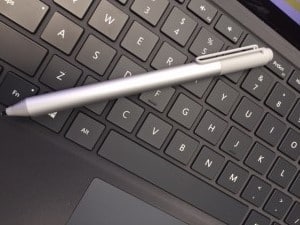
The Surface pen has been improved. It now has four times the sensitivity of the one that shipped with the previous Surface Pro 3. It also includes a digital eraser that works like the physical version. It is not perfect though. It works perfectly well within the apps from Microsoft like Edge and OneNote, But third party applications like Google Chrome, Firefox are a hit and miss affair.
The key selling point of Microsoft’s device is its versatility as either a tablet or laptop. The bezels are thinner and provide enough room to hold the tablet without smudging the display. Even so, we still recommend a screen protector as the larger display makes it more prone to scratches.
THE CONNECTORS
The power and volume buttons are located on the upper left edge when the device is held in landscape format or used as a PC. The USB and mini DisplayPorts are on the right edge. The headphone/microphone combo jack is located near the top edge of the device.
PROPRIETARY CONNECTOR
Considering the powerful CPU and larger display, it is no surprise that the Surface Pro comes with a small power brick instead of a fully integrated AC to DC converter. We are in two minds about the proprietary connector attached to the power brick. It is magnetically powered and multi-directional, so you do not have to worry about inserting it the wrong way.
At the same time, unlike other micro-USB connectors on Android tablets, it is also not easily replaceable if it gets damaged. Your only option is to buy a re placement directly from Microsoft. Since the Surface Pro 4 comes with a USB port, you can use that as well to charge the device.
The new Type Cover is a joy to use. It connects magnetically to the tablet and is good for long typing sessions. It really is the one feature that transforms Microsoft’s tablet into a fully functioning laptop.
Although the device transforms well into a laptop, it still requires a flat surface like a table. The adjustable kickstand will not be too happy on too many laps and has a tendency to topple.
The device’s speakers are also excellent. Predictably, due to their diminutive size, they are not that great at pumping out a lot of bass. But both music and audio are crystal clear and loud.
BATTERY LIFE
A massive 38 watt per hour battery powers the Surface Pro 4. Microsoft touts a nine hour battery life or about enough for a long distance flight. But this has to be taken with a large spoon of salt. At normal usage, we found that it lasts only about five to six hours. And that too with reduced screen brightness.
SOFTWARE & PERFORMANCE
From a software perspective, the Surface Pro 4 is a real winner. As mentioned earlier, this is a device with no compromise as a laptop or tablet. All the regular Windows applications run flawlessly just like on a laptop. Also, unlike the severely application-crippled ARM-based Surface 3, there is no shortage of applications to choose from.
In terms of performance, the Surface 4 Pro is no slouch. As a device aimed squarely at corporate and enterprise customers, it works as a fast office PC or tablet. Although the GPU is integrated, it is still possible to play a few casual games downloaded from the Windows Store. But high-end PC games are a no go on this even at reduced settings.
To conclude, Microsoft’s Surface Pro 4 is the ideal hybrid device available in the market today. That includes Android and Apple ecosystems.
Price: RM4,499
Value: 8/10
Features: 10/10
Performance: 8/10
Design: 10/10
Usability: 10/10
Verdict: The best features of a laptop and tablet combined in a single device on any platform
Total Score: 9.2
Specification
Size: 11.50 x 7.93 x .33 in inches
Weight: 1.68 pounds
Display: 12.3-inch PixelSense touch display
Resolution: 2,763 × 1,824 (267 ppi)
OS: Windows 10
Storage: 128GB/256GB/512GB
CPU: Core m3 base, Core i5 or i7
RAM: 4GB/8GB/16GB






One Response