I have a point of contention with game controllers, namely the left and right buttons and triggers. As of now, I still haven’t quite got my middle finger to rest on the triggers, so my index fingers are doing double duty. Razer, no stranger to the world of gaming peripherals, has released the Sabertooth, a souped up Xbox 360 controller. There’s one particular feature that caught my interest: rockable switches at the bottom. Could this be the controller I’ve been looking for?
Once You Go Black…
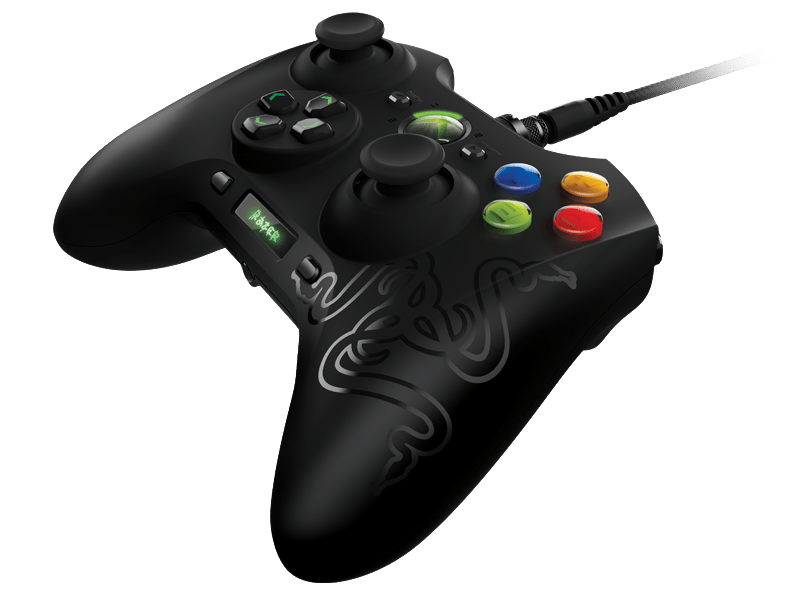
The Sabertooth is the follow-up to Razer’s previous Xbox 360 controller, the Onza. Compared to the Onza, it does look like the Sabertooth is a bit more refined in terms of design. As someone who has the Onza at home, the Sabertooth feels a lot more comfortable to hold – essential for long gaming sessions. The individual D-Pad buttons are smaller and the multi-function buttons have been repositioned. I personally prefer the bigger directional buttons on the Onza but that’s just me.
Bling Bling
The ABXY buttons light up by default, facilitating late night gaming marathons without having to turn on the lights. You have the option to turn it off though I prefer to leave them on. Why? Because they’re cool, that’s why! The buttons are raised slightly higher than the Onza, making them easier to access, but still offer that satisfying ‘click’ when you press them.

Look at the Screen
A small OLED display under the D-Pad and right analog stick reveals what the Sabertooth is truly capable of. The controller is open to a lot of customisation and the display is your window into these opportunities. You can configure the multi-function buttons and triggers, disable rumble, and adjust the sensitivity of the analog sticks. You can even tweak the Sabertooth to your own preferences, resulting in a controller that is truly your own.
Rock On!
Aside from the two multi-function buttons, the Sabertooth has multi-function triggers (MFTs) at the bottom. These are a pair of removable rockers that can be configured to any button on the controller. Should you prefer the vanilla feel, you can use the bundled tool to remove them. I have to say, this is the feature I like best. Assigning the left and right buttons to the triggers lets my index finger rest on the triggers, and my middle fingers on the MFTs. After a short gaming session, I got used to it without any difficulty. Get this if you’re looking for more than just a Xbox controller.
Price: RM 299
Cable length: 3m
Size: 110 x 154 x 57mm
Weight: 288g
Connectivity: USB 2.0
Features:
2 shoulder multi-function buttons (MFB)
4 removable multi-function buttons (MFT)
4 backlit Hyperesponse action buttons
OLED screen for feature customisation
Value: 8/10
Features: 9/10
Performance: 8/10
Design: 9/10
Usability: 9/10
Verdict: Meet your new go-to gaming controller.
Total Score: 8.6/10
This review can be found in the January 2014 issue of PC.com.