



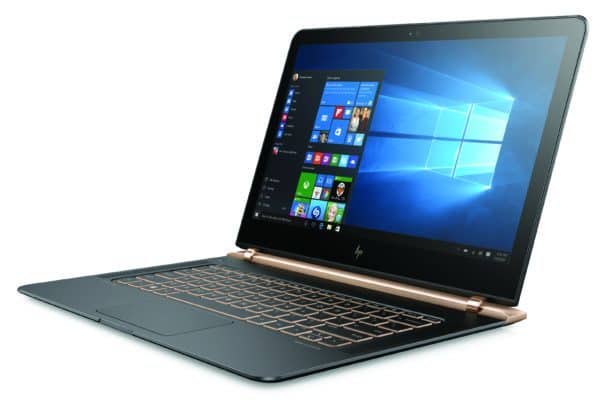
 Striking the Perfect Balance
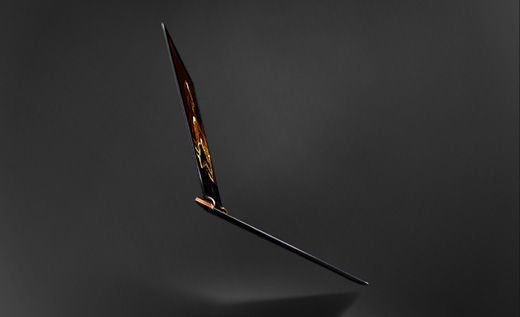
Weighing at only 1.11kg and 0.41 inches thick, the HP Spectre 13 strikes the perfect balance between weight distribution and design. Its matte black base paired with gold finishing simply oozes class and elegance, giving it an edge in design compared to Apple’s signature simplistic design in the Macbook Air. Marketed towards the more lavish and luxurious lifestyle, the Spectre 13 meets its asking price with gusto due to its exceptional design and weight.
B&O Certified Speakers
The speakers located on both sides of the keyboard are certified by Danish audio giants Bang & Olufsen. Although perfect for movie streaming and YouTube videos, the B&O certified speakers simply do not have enough depth in terms of being able to support Hi-Res audio. After running through my various Spotify Premium playlists, the speakers could only do so much when it comes to providing adequate bass, treble and underlying notes.
Subpar Battery Life
Incorporating a hybrid battery into its body, the Spectre 13 boasts a battery capable of lasting up to nine hours on a single charge. Sadly, that only happens when I leave the laptop idle without any programs running and even that is a stretch. Running Netflix on Google Chrome with Spotify in the background drained the battery from 100% to less than 20% in less than four hours.
Weird Port Placement
The placement of the Type-C USB ports and the 3.5mm headphone jack is somewhat of an inconvenience. Placed directly above the ventilation ports, the Spectre 13 not only heats the table and my thighs – when resting it on my lap – after an hour or two of usage, it also heats up my external hard drives and my headphones cable as well.
Points To Note
HD Heaven
In all its 13.3-inch goodness, the Spectre 13 was made for full HD screening. For the price you’re paying (which is a lot!), the display screen is beyond exceptional at the very least.
Golden Hinges
Although uniquely designed, the piston hinges on the Spectre 13 doesn’t allow this Ultrabook to go pass 120-degrees. Nonetheless, it does provide added points in both style and design with the screen resting on the hinges and not the body of the Ultrabook.
 Hit and Miss
The crisp and firm keyboard on the Spectre 13 is brilliant for everyday users as it gives a great typing experience as well as an audible and satisfying click. The glass trackpad however, is disappointing due to its overly-smooth feel and inaccurate cursor movement that occurs from time to time.
Thunderbolt Ports
With three USB Type-C ports available (two of which are Thunderbolt-enabled), transferring data and even charging the Spectre 13 is quick, easy and almost effortless.

24-hour Experience
First Impression
I feel like James Bond using this laptop; it also helps that it’s named after the latest JB movie as well.
4 Hours
Although great for movies, this laptop sure doesn’t last very long when it’s not plugged in.
12 Hours
This laptop was not made for the creative gamer type as it cannot run any games I’ve installed.
24 Hours
I charged it overnight, left it on Sleep for at least four hours and already almost half of the battery life is gone!
Specs
Price: RM5,999
Dimensions (HxWxD): 0.41 x 12.8 x 9.03 inches
Weight: 1.11 kg
Processor: 6th Generation Intel Core i5-6200U Processor (2.3GHz)
Memory: 8GB LPDDR3 SMRAM
Storage: 256GB SSD
Operating System: Windows 10
Display: 13.3” Diagonal Full HD IPS LED Display
Graphics: Intel Iris HD Graphics 520
Connectivity: Intel 802.11ac (2×2) WiFi and Bluetooth 4.2
Ports: 1 x USB 3.1 Gen. 1 (Type-C, HP USB Boost); 2 x USB 3.1 Gen. 2 (Type-C, HP USB Boost, Thunderbolt); 1 x headphone/microphone combo
Benchmark
PCMark8: 2494
Rating
V – 6
P – 6
F – 8
D – 10
U – 9
Total: 7.8
Verdict: Designed for greatness, the Spectre 13 does hold up as a top-notch Ultrabook in terms of design but it could be a lot better performance wise.





