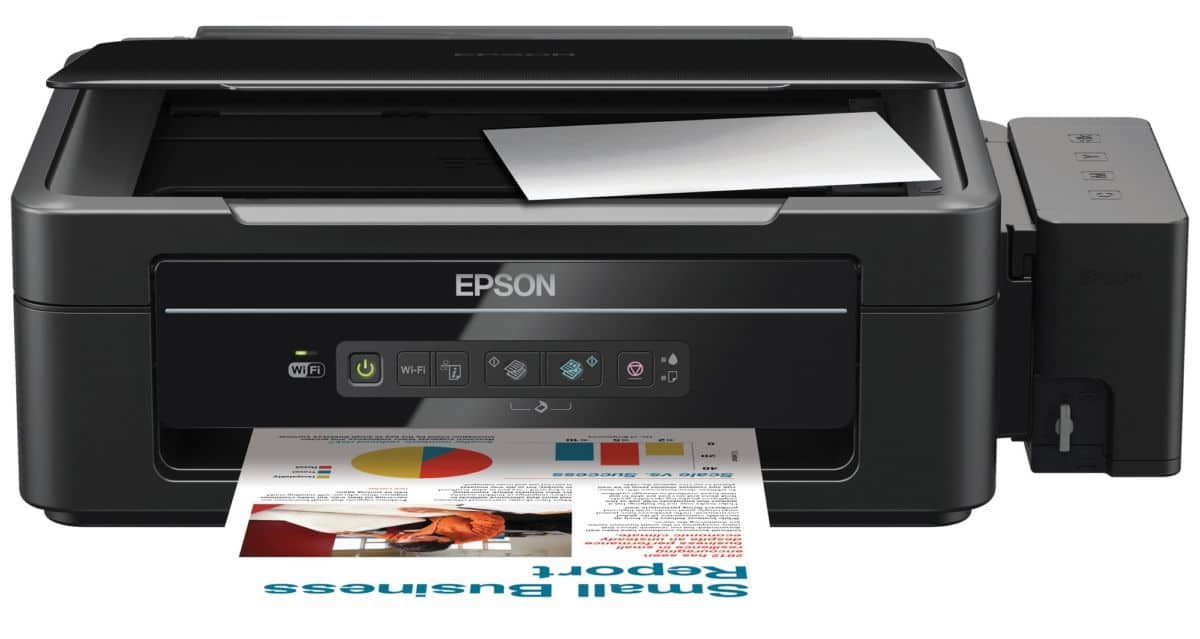
When it comes to printers, the easiest choice is always to go for the most affordable. In the case of multi-functional printers (MFP), it has to be those more affordable inkjet types. But how much can you do to really differentiate yourself from the rest? Well if you’re Epson, you’d go with fitting in external refillable ink tanks that connect directly to the printhead.

Complex Install
Setting up a printer should be an easy, if a little messy, task. That seemed to be the case with the Epson L355 MFP when I first unboxed it. It changed when I saw the manual. In summary, the whole process took longer than expected, required a pair of scissors, a lot of referencing with the manual, and an extensive trip to the washbasin to remove the ink from my fingers. Topping that is the 20 minute wait for the printer to ‘fill-up’ the printhead with the CMYK pigments being drawn from the tanks.
Printer on the Run
Once that is all done, and with the drivers/control hub installed, the Epson L355 is all set and ready to go! Spooling time is speedy and so is the warm-up time. I rarely had to wait once I sent anything to print as it will start-up almost immediately, even when on sleep mode. Print speed varies on the content I push out – its 15-25 seconds for black/white and 20 seconds to a minute for grayscale/colour and enriched hues printing respectively.
Super Saturated
Print outs from the Epson L355 is superb with a nice balance of warm and cool hues. I like how everything looked crisp and balanced on every sheet it manages to produce with nearly no smudging and having all the colours blend nicely to make a great high resolution image. Simple black/white subjects also come out without any errors, giving me the impression that general outputs by this printer seem almost laser-like.
Easy Operator
All-in-all, using the Epson L355 is a cinch. Need to scan/copy something quick? Just push the one-touch button on the flip-up control console and you’re can start saving high-quality digital libraries. The built-in wireless system allows this printer to be linked onto the network via Wi-Fi or have any mobile device send in files for print remotely through the Epson iPrint app. Complementing all this is the smooth ink management system and handy transport mode that are incorporated into the overall design of the printer. If anything, Epson sure did consider all the bases.
Dimensions (W x H x D): 472 x 300 x 145mm
Weight: 4.4kg
Print Method: On-demand ink jet
Nozzle Configuration: 180 nozzles Black, 59 nozzles each colour (Cyan, Magenta, Yellow)
Print Direction: Bi-directional printing, Uni-directional printing
Maximum Resolution: 5760 x 1440 dpi (with Variable-Sized Droplet Technology)
Minimum Ink Droplet Volume: 3pl
Max Black Draft Text – Memo (A4): Approx. 33 ppm / 15 ppm (Bk/Cl)
ISO 24734, A4: Approx. 9.0 ipm / 4.5 ipm (Bk/Cl))
Max Photo Draft – 10x15cm/4x6in: Approx. 27 sec per photo (W/Border)
Photo Default – 10x15cm/4x6in: Approx. 69 sec per photo (W/Border)
Double-sided Printing: Yes (Manual)
Copy Speed:
– Max. Black Draft Text – Memo (A4): Approx. 5 sec (Draft)
– Max. Colour Draft Text – Memo (A4): Approx. 10 sec (Draft)
Copy Mode: Standard
Maximum Copies From Standalone: 20 sheets (fixed)
Scanner Type: Flatbed colour image scanner
Sensor Type: CIS
Optical Resolution: 1200 dpi x 2400 dpi
Paper Feed Method: Friction
Paper Hold Capacity: Input (100 sheets, A4 Plain paper (75g/m2), 20 sheets, Premium Glossy Photo Paper, Output (30 sheets, A4 Plain, 20 sheets, Premium Glossy Photo Paper)
I/O Ports: USB 2.0 Hi-Speed, Power
Connectivity: IEEE 802.11 b/g/n, Epson iPrint
Value: 9/10
Features: 8/10
Performance: 9/10
Design: 8/10
Usability: 9/10
Verdict: Now there is no need to get pirated tanks! Good going Epson!
Total: 8.6/10