Microsoft has annouced the general availability of the free storytelling app ‘Sway’ that allows users to create and share interactive reports, presentations, assignments, lessons and projects on a freshly designed layout. Sway is also moving beyond First Release and rolling out to all eligible Office 365 for business and education customers to 214 markets worldwide. The app is free to any consumer with Microsoft account and now with Windows 10 a new version of Sway with new layout and publishing capabilities is released.
Sway was first introduced as member of Office 10 months ago that allowed users to create professional designs in minutes. The design engine takes your images, text, videos and other media flow and stitches together to make a digital story enhanced visually by the engine. Creations then can be viewed across phones, tablets, laptops and Surface devices.
Sway On Windows 10
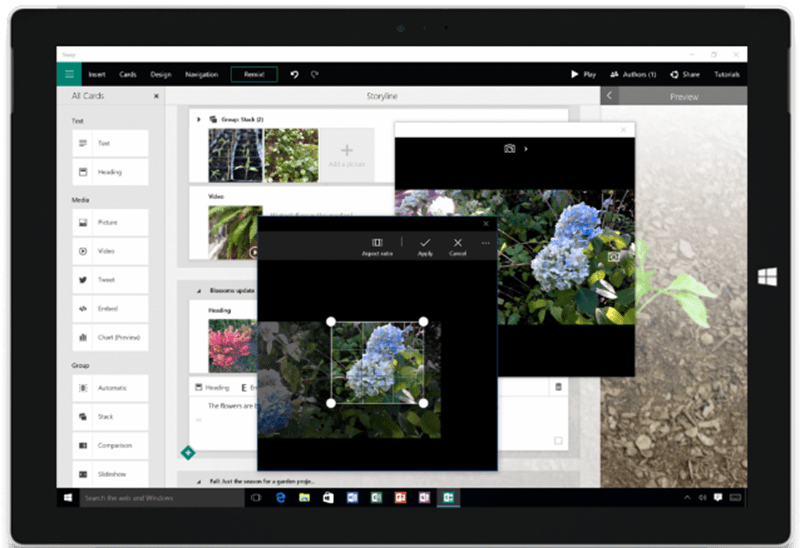
Apart from allowing you access from different platforms, Sways design engine also allows you to build, edit and share your work on windows tablet or desktop of laptop. You can also snap pictures direct into Sway from the built in cameras on your devices however Windows phone users will have to wait as its not available as of yet. You can stay logged in with multiple accounts at once if you use the same device for both work and home.
New Way of Presentating
A new layout in the Navigation pane has been introduced on the new Sway, which displays groupings of content (images, text, videos, tweets, etc.) one screen at a time. Whether it’s a few words with a background image, a set of images and supporting bullet points, or a cluster of interactive elements, now can be delivered in a presentation for viewing across devices.
Sway with Relaunched Docs.com
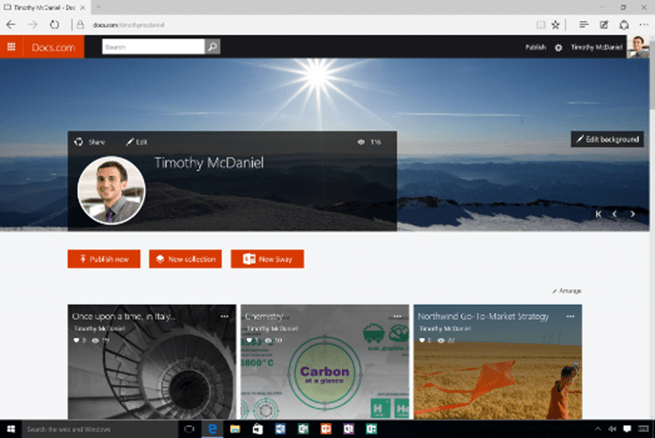
With just a tap or click of the Share button, you can now choose to publish Sways directly to the newly relaunched Docs.com, an Internet destination to publish Office documents in full fidelity for the world to find, browse and share. Along with adding support for Sway, Microssoft has also improved the overall Docs.com experience for publishing, managing and consuming content.
Docs.com lets you organize your Sways and other Office content into collections. Word, Excel, PowerPoint and Office Mix files are displayed interactively and with full fidelity. You can also add PDFs and web links. Create a stylish Docs.com profile page using a Sway to share more about your passions and expertise. On Docs.com, Sways, documents, collections or profiles can be discovered by search engines, browsed on Docs.com, and shared in social media or on the web. Docs.com provides data on how many views you’re getting, and it’s easy for anybody viewing your Docs.com files to add comments and discover your other published work as well.