



Making calls just got easier with the QuickDial function that can be found in the Galaxy S6 and S7 edge. Now you can complete this task more efficiently than ever, even when you’re wearing gloves, cooking or just feeling lazy.
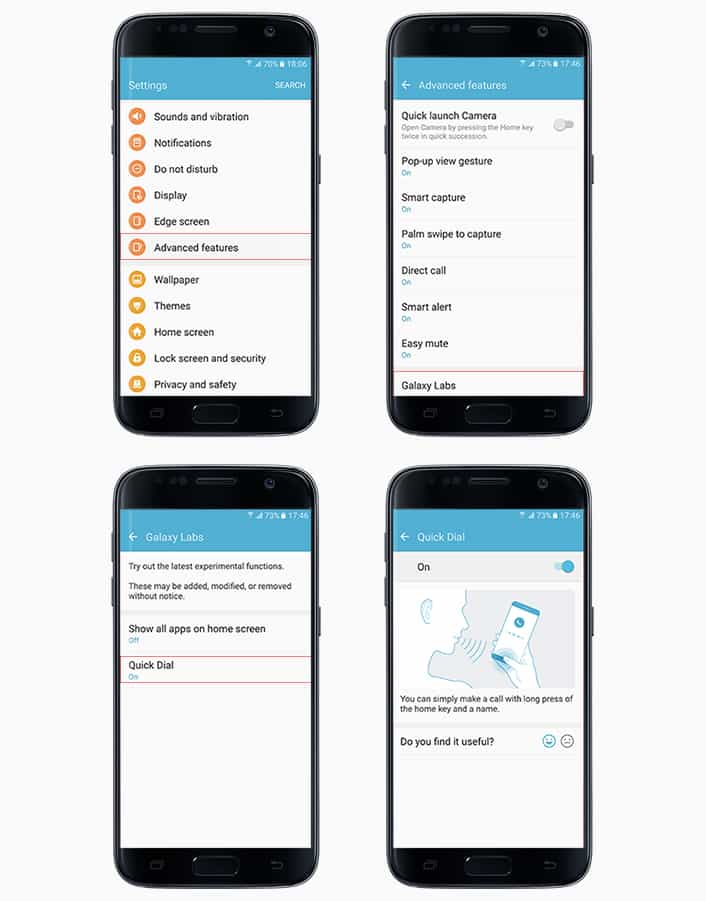
Quick Dial is easy to toggle on (Settings → Advanced Features → Galaxy Labs → Quick Dial). Once enabled, you can access the feature by a long press of the home key from any screen, even when the display is off. If your phone is locked with fingerprint, you can use Quick Dial after unlocking the phone.
Once launched, the feature clearly prompts you to speak the name of the person you would like to call (“John Smith,” for example). Other natural verbal commands also work (such as: “Please call John Smith” or “Dial John Smith”).
Unlike conventional voice recognition systems, which send spoken commands to servers for processing, Quick Dial uses hybrid processing via servers, as well as the device itself. As such, the system is able to make a call within three seconds of receiving a voice command. The system allows ensures the phone makes voice calls within three seconds of receiving a voice command. In the case of individuals with has a high number of contacts, users may have to repeat their voice command two or three times in order to place their call.
Quick Dial is intuitive and user-friendly, which makes it easy for anyone to make a phone call in seconds, no matter what life has in store. Quick Dial can currently be used in 15 languages including English, Spanish, Chinese and French.





