



About data storage and where it stands today.
by Matthew Yap
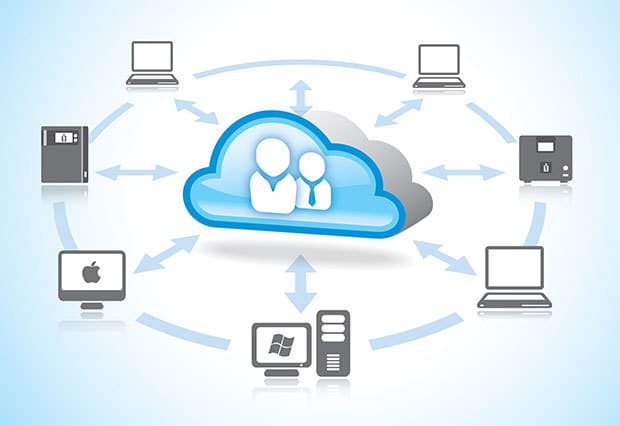
Technology continues to enrich our lives and also serves as the catalyst for change, improving various aspects our lives or making our work easier in some cases. As new tech appear, it also gives rise to new trends.
For example, the resurgence of the use of mobile PCs. The need for a proper keyboard and greater computing power than tablets saw the rise of 2-in-1s, convertible and also the 360-degree hinge laptop computers. Another example is our Internet speeds. They continue to get faster while bandwidth slowly becomes cheaper, even if it isn’t as fast as we’d like it to be locally. Due to that, streaming became possible, followed by file hosting and now public cloud storage.
Mobility and connectivity have now emerged to become important factors today, which results in the rise of cloud storage services that can sync data across multiple devices. While that being the case, it’s also clear that there are many who continue to use traditional storage media if only due to the demand for greater storage capacity. The purpose of this article is to explore both sides of the coin, to help you see the heads or tails of the situation (geddit?).
This month, our cover story is on data storage, how it has evolved and how we are using them today. Most of this is info researched from the Internet and my opinion is just that, my own.

DISK FULL OF PLATTERS
The most common data storage technology, hard disk drive (HDD), was first invented in 1954 and formally used in 1956 by IBM. In its earliest form, HDDs were huge and bulky hardware such as the very first IBM 350 RAMAC, which was a machine the size of two standard refrigerators! It could only store 3.75MB and wasn’t something the average Joe could buy. Besides that, a few key differences were that back then the drives were mostly external, Today, IBM no longer manufactures HDDs and is mostly focused on selling services than hardware.
HDDs store data by using “platters” coated in magnetic material. These are stacked on top one another to form the basis of the 2.5 and 3.5 inch drives we use today. The data inside HDDs are read using the actuator arm inside device. Think of a turntable or those old gramophones and you’ll get the idea. Indeed, the way it works is similar in that sense.
The reason why HDDs will remain is simple enough, it has a lot of advantages that appeal to the mass market. Storage capacity is one obvious reason. The volume of data stored grows every year and most data all over the world are still stored on hard drives. Indeed, for most of us HDDs remain the data storage medium of choice.
While it has slowed down in recent years, the limit of data you can store on HDDs will continue to grow. And when the Heat-assisted magnetic recording (HAMR) actually takes off, we can expect capacities to start growing again. As it is, HDDs give you immense amounts of storage space of up to 8TB, with a 10TB mode using shingled magnetic recording (SMR) expected this year. When it comes to sheer amount of files you can store, nothing beats having a bunch of high capacity HDDs.
Secondly, there’s pricing – HDDs are cheap, compared to SSDs or public cloud services. Using 1TB as the baseline to compare, you can get a 1TB HDD for about RM180, nearly 10 times that price for an SSD of that capacity, and approximately RM443.34 per year for an equivalent cloud service. As you can see, if it’s archiving media content like music, high resolution photos or 4K videos, choosing a HDD is practically a no-brainer. Popular HDDs include Western Digital’s Green drives, as well as Seagate’s Desktop HDDs.
The third reason is data transfer speeds. Though they may not be as fast as their SSD brethren, HDDs beat cloud storage hands down. File transfer is fast, especially when you have USB 3.0 or other high-speed transfer interfaces. This allows you to quickly back up or move your files around, instead of taking forever to sync with our less than fantastic Internet speed in Malaysia.
Last but not least, storing your data on your own HDD means you are not beholden to some third-party to secure your data. Of course, many of you understand that there are risks in keeping your data anywhere. But it’s much easier to secure data that is private, than something on the public cloud.
Times have changed, however, and HDDs aren’t the sole force in the data storage market now. The masses have different needs these days, needs that are better fulfilled by the increasingly popular Solid State Drive (SSD).

SPEEDY DRIVES
The Solid State Drive (SSD) is the darling to many of today’s PC user. Similar to the origins of HDDs, the original concept to the SSD first appeared in the 1950s, in the form of magnetic core memory and charged capacitor read-only storage. The idea is to use two-way magnetised cores to store bits of 1s and 0s in them, data essentially, instead of ‘saving’ on platters. However, unlike HDDs that went on to prosper, this type of data storage was exorbitantly expensive and wasn’t widely used.
Fast forwarding ahead, SSDs started picking up steam when Toshiba introduced the NAND flash in 1989. However, the big jump to widespread consumer use probably began around 2010, as SSDs became the next big thing in the PC master race and many began adopting it. My very first SSD was also bought around that time – a measly 30GB at about 200Mbps read and half that in write speed, yet costing me about RM450. Running my OS and core programs now is a Samsung 840 Evo with twice the read/write speeds, 500GB of storage capacity and just a little over RM600 from Amazon. It’s amazing how fast the technology has evolved.
SSDs have carved a place in the data storage market. If a gamer wants to build a high-end desktop rig and has the cash to splash, you can bet that he’ll get a good SSD for his new gaming computer. Enterprise companies love SSDs too, for the speed and reliability provided. Not only do rich gamers want them, some professional video editors or photographers use them for its faster speeds.
As prices for SSDs continue to go down, probably the only thing holding it back from fully hit mass market is capacity. Nand flash tech might just advance enough that most people will be using SSDs someday, but that day isn’t now. However, for those who can afford it, SSDs offer a few key benefits: performance, reliability and low power consumption. The first two are more relevant to consumers, while the third is a big reason many companies have turned to SSDs for their server storage needs.
A good SSD has about 500MB/s read and write speed, vastly greater than when consumers first started using them. But why are they so fast? It’s due to the ability to access data electronically and on any location on the drive with equal speed. Above all, SSDs outpace HDDs by light-years because they have random data access times of 0.1ms or less, compared to the latter’s 10ms or more. Basic maths says that’s over 100 times faster! It’s hard to SSDs compare to cloud storage, but I’m sure they can’t be using SSDs in their storage servers exclusively, since that would be ridiculously expensive. SSD users will generally tell you the same thing: they enjoy faster PC boot time, shutdown, loading of applications, web browsing, installing software, or when copying files.
Nearly all of SSDs pros are because there’s no moving parts. Since there are no mechanical components, SSDs don’t generate noise, weigh less, and are more resistant to shock. This is how they make premium notebook PCs that are quieter and lighter. Additionally, it’s also the main reason why they tend to last longer.
There’s more, but this is just a rough overview for SSDs. Next up, cloud storage for individuals – the cloud.

IN THE CLOUDS
There are two main types of consumer cloud storage: Personal and Public. An example of the former would be more a NAS (Network Attached Storage) that you can access externally via the cloud. You only pay for the hardware, thus it is private. Public cloud storage on the other hand, is a type of service that offers you data storage through the Internet. In this case, you could use a small amount of storage for free, with possibility of adding more by referring your friends to the service, or other things like connecting your social media accounts.
Public cloud storage for consumers can be like a file hosting service of sorts, not unlike services like Megaupload or DepositFiles. Essentially, they are considered file-syncing services. The common ones you know of are DropBox, iCloud, Google Drive, Microsoft OneDrive and Box. They all have near identical features and more or less work the same way. By the way, if you are curious, do check out our Showdown this month to find out which public cloud storage service works best for you.
So what makes cloud storage so good? Availability. Public cloud storage services are awesome these days because of the different types of devices we use to consume content and data. The average Malaysian consumer now carry at least one smart device, a smartphone, and also use at least one PC for work or entertainment. Since these services allow HTTP access, some even with FTP, it means that as long as the device is connected to the Internet, you will be able to get access to your files or documents. Say you use DropBox, probably the most popular of such services, you can access files you uploaded to your account not just from your desktop PC, but also from a tablet, or your smart phone. With cloud storage, files can be shared to anyone who has access to the storage account, be it sales guys on the go or managers sitting in their office.
This reason alone compels many to use the public cloud storage services. Data can be read without needing to carry external drives around, which is convenient for those who work outside of offices. Imagine that you frequently go on business meetings overseas. With your files on the cloud you don’t have to worry if you forgot to save your presentation slides to a thumbdrive.

SO.. WHICH ONE DO I USE?
Well, why not use both! The great thing about storage media is that there is no need to limit yourself to one. Want performance and storage space? Get a SSD and HDD for your desktop, if you can afford to. Don’t have that much of a budget? Not a problem, just spend a one-time cost of a good NAS for your heavy duty storage needs, then pair with backups of important documents or files on the cloud. I’d say the latter works better for most individuals.
Then there’s the important question, is local storage getting phased out by cloud storage? The answer is: No. As convenient as cloud storage has become, it’s still far from displacing the traditional storage medium for good, especially considering the amount of money you have to fork out for a good public cloud service. For the foreseeable future, HDDs and SSDs will be sticking around.
TAKING IT FROM THE EXPERTS
Though I couldn’t get much from analysts and the cloud storage vendors, I managed to get in touch with Simon Whitford. As Western Digital Asia Pacific’s Senior Regional Marketing Manager, Content Solutions Business, he’s in position to answer some of our questions regarding storage, HDDs in particular.
 PC.Com: Traditional storage is still used today. Besides its – perhaps obvious – need in endpoint/end user systems, what are reasons for us to continue using traditional storage?
Simon: There is still demand for traditional storage today as its functionality remains relevant in many situations. The production of data is growing by as much as 40 percent per year, and it is estimated that by 2020 more than 75 percent of the world’s data will be stored on hard drives – in the cloud, in computing systems and in a variety of high-capacity personal storage devices and systems. Assuming “traditional” storage is referring to local, portable and personal cloud storage, applications include: areas with no connectivity, where cloud technology would be rendered as avoid; backing-up data and content on-the-go; as an additional layer of backing up and storage on top of archiving it on the personal cloud, especially for consumers who are extremely cautious over their data; faster backup; surveillance; entertainment; and as a centralised LAN (Local Area Network) storage.
Many consumers feel more secured with the physical presence of a storage drive, instead of solely depending on cloud storage alone. As education on the security features for cloud storage require some time and needs to be done in phases, traditional storage solutions still serve an important purpose as additional storage peripheral.
PC.Com: Using external hard disks would void the high mobility advantage that ultra-portables provide. What kind of new features can be added to externals that would be critical enough for them to continue using them instead of cloud storage?
Simon: WD makes 2 TB drives that run on USB power and easily fit into one’s pocket; thus, they are very mobile. Additionally, the personal cloud storage concept and capabilities have also been incorporated within portable drives today, bringing a whole new experience and approach to storage for consumers. Personal cloud storage is not limited to network attached systems alone, as the latest development in portable hard drives includes built-in WiFi network, thus eliminating the dependability on internet signals and strength as the device itself is capable of setting up its own WiFi network for data storing and sharing. Aside from being portable and easy to carry around, customers can enjoy a robust, reliable storage solution that enables them to back-up their digital content on-the-go, while streaming and sharing their content with several devices – an entertainment hub on the go, too.
PC.Com: Some laptops use M.2 SATA SSDs, which can be kept small. Of course, the challenge is increasing storage capacity. Are there any ideas for this storage format that can improve it to better suit the modern PC user, both desktop and mobile?
Simon: The M.2 interface is actually replacing the mSATA standard (which took advantage of the existing PCI Express Mini Card form factor and connector). The M.2 standard will allow for longer modules and double sided components, which can provide for double the storage capacity within the footprint of an mSATA SSD.
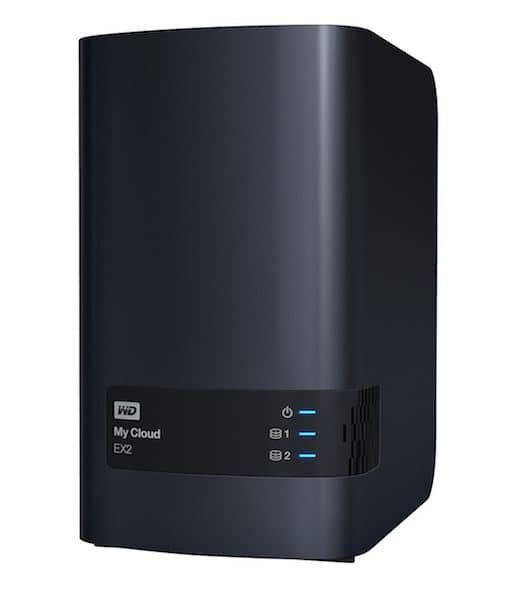 PC.Com: Since you can sync personal cloud storage across devices, it has reliability and redundancy. Has that made cloud a better choice for availability, or is RAID still better? In what situation or setup would a storage RAID remain the better choice?
Simon: RAID and Cloud storage combined offer a powerful solution for consumers; and separately provide different advantages. Cloud no doubt offers the convenience and accessibility to storage anywhere, as long as the user has internet connectivity. RAID is an inbuilt system-level setting that offers consumers redundancy as a form of extra protection. Should one of the multiple drives in RAID 1 or 5 configurations fail, their data remains intact on another drive.
The value of personal or business data cannot be underestimated. You can’t go back in time and take photos of your children when they were youngsters. I would recommend a personal cloud solution that offers either RAID 1 or 5. Storing your files on a centralised storage device offers many advantages like being able to consume the data on many devices, enjoying fast performance at home and having the data safe and secure on your home network and not stored in an anonymous “somewhere” cloud.
PC.Com: What would you say are a hybrid NAS’ (with file sync over the internet like a cloud) advantages over full cloud storage?
Simon: The hybrid NAS – utilizing the combination of a personal cloud (NAS) and the public cloud -offers consumers full control over their storage content, as the physical personal cloud drive is placed in the owner’s home, where they know all their data securely resides. They still can access their data on the personal cloud from anywhere over the world. This is in contrast to storing your data in the cloud, where the user does not have direct, physical control of the information. Storing data only in the cloud raises concerns over privacy with some consumers. The hybrid solution could be the best solution for some people.
In a hybrid situation, the users have the option of saving a subset of their data and content to the cloud while maintaining the full copy on the personal cloud device; and of backing up their personal cloud content over the cloud for off-site protection.
When it comes to cost, the personal cloud user is required to pay only one amount to purchase the hybrid NAS to enjoy all the above benefits, while cloud storage requires the user to pay a monthly sum depending on the storage capacity selection of the user.
PC.Com: Are there any other hybrid offerings that would better fit today’s mobile worker?
Simon: In WD’s belt of product offerings, besides our My Cloud series the My Passport Wireless is a portable storage product offering consumer a private cloud network capable of sharing their content wirelessly anytime, anywhere.

PC.Com: Will HDDs evolve beyond the current magnetic platter? If so, what’s next?
Simon: There are many storage technologies that will continue to advance the areal density (storage capacity) of a given magnetic platter. Technologies like SMR (shingled magnetic recording), HAMR (heat assigned magnetic recording), TDMR (two dimensional magnetic recording) are going to keep magnetic platters around for many years to come.





