Review by Din
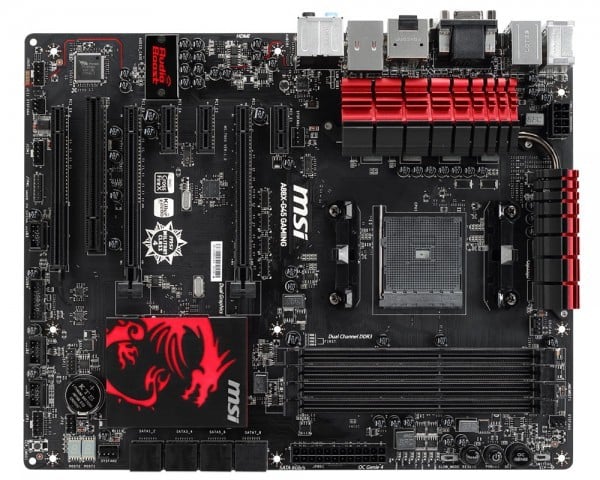
While it’s been weeks since the launch of new line-up of AMD Kaveri of APUs, there has been few motherboards on the market that support the new processor – namely the FM2+ socket types, as many proper motherboards are not sold in the Malaysia. Fortunately MSI is bringing in its own range and one of them is targeted specifically for the gaming market. Yes, let’s enter the MSI A88X-G45 Gaming. Emblazed with its trademark Tribal Dragon logo at the front, how does this motherboard fare? Time to find out.
Let’s Game
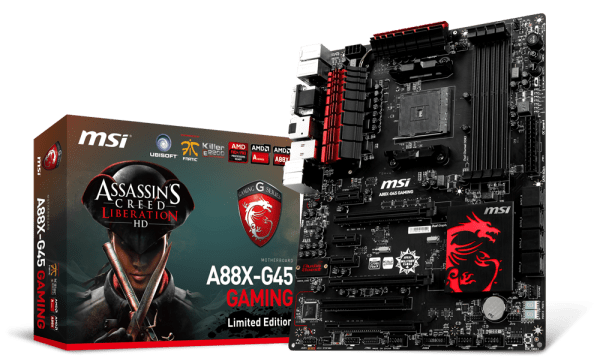
The very first thing that you will notice when you get this motherboard is the large Ubisoft’s Assasin’s Creed Liberation HD picture at the front. Yes folks, MSI has decided to bundle its product with a copy of the popular game. Now you have one more reason to use it for gaming purposes. At the front of the box is also the large MSI Gaming Dragon mark, which shows everyone you mean business. Talk about giving people a great first impression.
You AMD?
Inside the motherboard box, you will find a smaller box which contain a few extras, such as a Driver DVD, SATA cables, MSI Gaming emblem sticker, MSI Gaming door hanger, an instruction booklet, and a coupon to get Assassin’s Creed Liberation HD from the Ubisoft store. Not much but honestly it’s what you would expect to get started.
Overclock That!
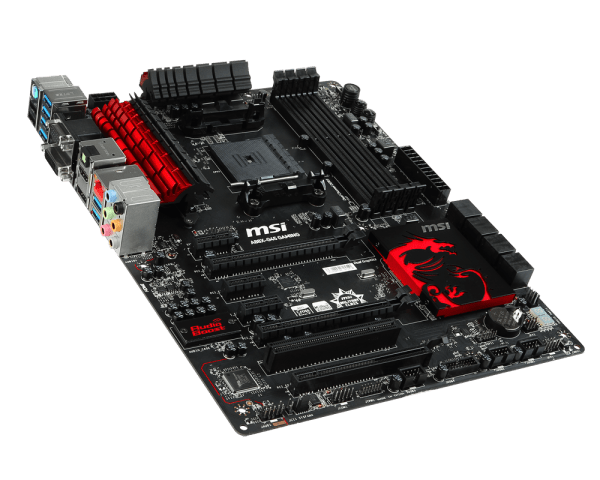
AMD’s new Kaveri, specifically the unlocked ones, are made ready to be popped open and overclocked. Hence my happiness with the encounter of the MSI overclocking menu in the BIOS. Everything looks quite straightforward and easy to navigate. However, if you are a tad overwhelmed with the process, don’t fret as MSI’s OC Genie button is also included on this motherboard. When you press the button on it, the entire process will start off automatically and find the most optimised overclocking speed for your system. We found that it does overclock lower than what we could go for manually but it does the job well enough as the settings that the OC Genie chose is also really stable.
Outputs Galore
AMD’s APU is well touted to have the best integrated GPU of any processor out there and the Kaveri is no different. In it is the R7 GPU as well as various graphic output to use this GPU. You are getting one of each: VGA, HDMI, DVI and DisplayPort. Not only that, the motherboard supports three separate video outputs without having to use the DisplayPort! Also at the rear you will find two USB 2.0 ports, six USB 3.0 ports, as well as an E2200 Killer Network Gigabit LAN port. Four banks for DDR3 RAM slots supports dual channel RAM of up to 2400Mhz. You also get eight SATA 3 connectors. For those that feel they need more grunt in terms of graphics, three slots of PCI x16 are there to be used and two of them are rated at Gen 3! You can also use these slots for a triple Crossfire configuration. Sadly there is no SLI support.
The Little Things
To make sure that gamers have the best experience possible, MSI also took the liberty to add some gamer-centric touches. The rear USB is called the Gaming Device Port as it is optimised for mice that have high polling rates. This means that your mouse would be able to operate with better response times that will create a smoother travel experience. Also to make sure you can hear every little detail in your gaming session, the MSI A88X-G45 Gaming also comes equipped with Audio Boost, where a combination of high quality audio capacitors and gold plated connectors means you are getting the very best in terms of connectivity options. This translates to improved audio transmissions that will result in great sound quality.
Liberated
This is really one gaming motherboard that fully shows off Kaveri’s processing potential. I paired it up the board with an AMD Kaveri A10-7700K processor and managed to bump the default 3.4Ghz clock to 4.5GHz in just minutes. Throughout the review, the system always remained cool and, more importantly, did not experience any slowdowns or processing lags. It’s a plus that it looks cool as well. Honestly, if you want to get the new Kaveri for your gaming rig then you won’t have to look for another motherboard beyond what MSI has to offer. This is because it has made sure the A88X-G45 Gaming is the only board that you would ever consider and need for your PC.
CPU: AMD Socket FM2+
CPU (Max Support): AMD Socket FM2+/ FM2 A-Series/Athlon Processors
Chipset: AMD A88X
Memory: 4 x DIMM, Max. 32GB, DDR3 3000(O.C.)/2933(O.C.)/2800(O.C.)/2666(O.C.)/2600(O.C.)/2500(O.C.)/2400(O.C.) MHz Memory
Dual Channel Memory Architecture
Max Memory: 64GB
Graphics: Integrated Graphics Processor
I/O Ports: 1x HDMI, 1x VGA, 1X DVI, 1x DisplayPort,
Ports: 8 x USB3.0, 8 x USB2.0, 1x GigaBit LAN
Slots:
– 2 x PCIe 3.0 x16 slots, supports up to PCIe 3.0 x16 speed
– 3 x PCIe 2.0 x1 slots
– 1 x PCI slots
– 8x SATA 6Gb/s ports (SATA1-4)
Value: 9/10
Features: 8/10
Performance: 7/10
Design: 8/10
Usability: 9/10
PCMark 8: 3219 (Home)
Verdict: Here comes AMD Kaveri and it’s for gaming! Rejoice!
Total Score: 8.2/10