Review by Andrew Yew
Multifunction printers (MFP) come in all shapes and sizes, with each catering to different usage types. Smaller ones are built for general home usage, while the larger models fit in the office. As for the gigantic series, well they are made to churn out larger prints. This particular beauty, the Dell C2665dnf Colour MFP, is aimed towards smaller offices that don’t need prints in larger paper types. So, is it good enough for your office or is it a large placeholder for coffee banter?
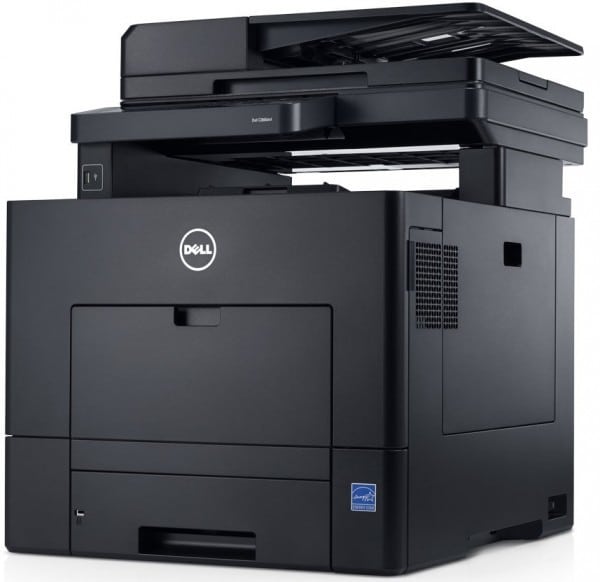
Back in Black
The Dell C2665dnf is a black monolith and its bulky size relegates it to a corner in your office. Its rather short frame does require you to place it on a table as it would be awkward and physically straining to have to bend down every instance you scan or retrieve a print. You might want to get a coworker to help you out with moving it to a taller location as trying it alone can be a real handful.
Breezy Setup
Once you unpack the C2665dnf from its cardboard cage, setup is very simple: just rip off every piece of orange tape, connect it to a power source and telephone port (if you want fax capability), and you’re set – for the most part. Of course, you can also connect it to your network with the RJ45 port or via USB (for networked PC control), which is imperative if you want the rest of the office to access the printer. On the user’s end, they can either install the drivers through the provided CD or download the drivers off Dell’s support website.

Touchy Feely
The Dell C2665dnf has a touch display as well as some buttons on its control panel, which lets you perform print, copy, scan and fax options. Most of the work can be done through the touch display proper. The interface is reminiscent of the Modern User Interface of Windows 8, with blue and green coloured tiles arranged nicely that let you go through the options by swiping left and right. If you’re using Windows 8, you will feel right at home.
Printing Press
With a USB port in front and NFC connectivity, printing need not be done through your PC. Printing files from a USB drive had been easy and fast. I find it odd that it does not support DOC files out of the box. This is quickly rectified with a simple driver installation and device configuration, so it’s not a real big issue. As for printing, it took less than a minute to produce ten crispy black-and-white PDFs, while the same PDF printout in colour, which looked vibrant and sharp, took 43 seconds – both inclusive of warm-up time. The other functions work well enough but the real hero here is the printing capabilities, which is pretty top notch for me both in terms of speed and production performance.
Dimensions (W x Dx H): 439 x 529.5 x 558mm
Weight: 32.6kg
Print Speed A4: Up to 27ppm (Simplex); 18ppm (Duplex)
First Print Outime: 7.5 seconds
Scan Resolution: 1200 x 1200dpi
Scan Format: TIFF (Single/Multi), JPEG, PDF
Paper Tray Capacity: 250 (standard tray), 150 (multipurpose tray)
Value: 8/10
Features: 9/10
Performance: 9/10
Design: 8/10
Usability: 9/10
Verdict: Small on footprint, big on features.
Total Score: 8.6/10