



Valve is finally enabling Bluetooth connectivity for its Steam Controller. The latest Steam Client Beta includes the feature Bluetooth Low Energy (BLE) for Steam Controllers. This feature is part of the upcoming Steam Link app, but there are other reasons you’d want to use it too.

Valve themselves suggest using BLE when streaming games to smartphones with the Steam Link app. Alternatively, BLE may be handy if using Steam Controllers on devices without USB ports. Of course, if you lose your Steam Controller’s wireless receiver BLE would be a sufficient replacement tool.
Valve does point out however that if BLE is unnecessary, it’s better to use the wireless receiver. Ian of Valve says, “The BLE connection is excellent, but the native wireless protocol was designed from the ground up to provide the best experience for a Steam Controller.”
So how do you get the BLE functionality then? Well first of all you’re going to want to update your firmware. You can do so by initially going into your Steam client and opting in to Steam Client Beta. Once you’ve done that, connect your Steam Controller to your PC. You should then be greeted by this popup:

All you’ve got to do then is select ‘Update Firmware Now‘, and voila! You now have Bluetooth connectivity for your Steam Controller. If you hit into any bumps, you can click here for a thorough step by step guide.
On top of that, you can still use your original wireless receiver even if you’ve been using the BLE. To switch between modes, you will need to turn on your Steam Controller like this:
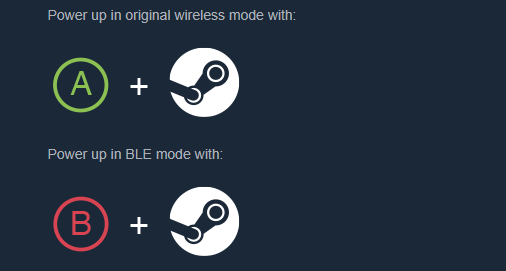
Powering it up normally however would use your last used connectivity mode.
To read Valve’s full statement on their launch of Bluetooth connectivity for the Steam Controller, you can click here.





