Sometimes there are times where there are places in your office or in your home that can’t seem to find that elusive wifi signal from your router. While a savvy person would just made some new wiring, for a number of people, Ethernet cable might not be an option: maybe it’s unsightly for them or maybe the place is not even theirs and they can’t just do modification without permission.
This is where a Wi-Fi repeater comes in handy. A Wi-Fi repeater is basically a middleman that helps bridge the Wi-Fi connection from your device to your router or AP.
But not every repeater is made the same. Most have issues like having a really confusing way to setup or the nightmare for gamers, repeaters that don’t seem to have the same throughput as a direct connection to the router.
Packing a Punch
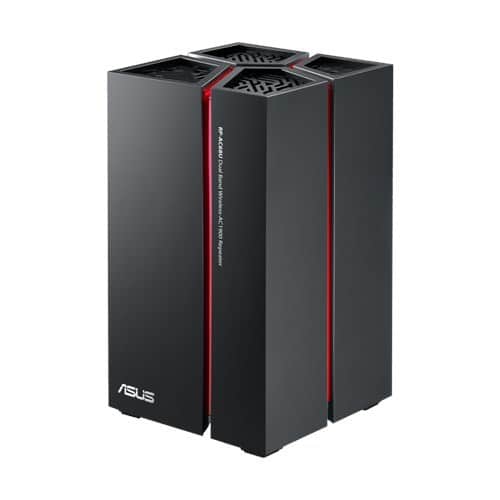
The RP-AC68U repeater looks intimidating. It looks like rectangle bin or a Tupperware with various ventilation like holes . And at 860g, it’s quite a hefty device.
At the front, a single Asus logo can be seen. This doubles as the LED toggle button. Meanwhile in the rear is its power button, WPS button, two strength LED indicators for each 2.4 GHz and 5GHz.
And get this: not one, not two, but FIVE gigabit LAN ports! This is the first time that we tested a repeater that have a gigabit LAN included. A single USB 3.0 port completes the rear.
Easy Set-Up
We plugged in the ASUS RP-68U and it starts off glowing red. This looks awesome, especially in the dead of the night. If you feel that the LED is too bright, you can turn it off by just touching the ASUS ogo on the front.
Setup is easy. You can either use the WPS button on the rear of the repeater to pair it with an existing router. Alternatively, you can connect via Wi-Fi and use the web based wizard to set-up your repeater. It took less than 10 minutes to set-up – it’s that simple!
Not Just a Repeat
The ASUS RP-AC68U works not only as a repeater, it is also a dedicated access point. In repeater mode, it will use your existing Wi-Fi’s password to connect.
The five gigabit port at the rear, on the other hand, can be used to connect five devices using Ethernet, with DHCPcoming from the parent’s network. This means that a single RP-AC68Ucan become, by itself, a Wi-Fi receiver to devices that does not have built in Wi-Fi.
For access point mode, you can just connect an Ethernet cable from your router to one of the Ethernet port on the repeater and change the mode in the web menu. You can use the single USB 3.0 to connect an external hard drive to act as a shared network folder or a printer for a shared printer.
Super Speedster
The ASUS RP-AC68U supports Wi-Fi 802.11a/b/c/g/n. It has two concurrent frequencies, the older 2.4 GHz and the newer 5GHz. We managed to get around 240mb/s using the 5GHz on our notebook.
The signal is quite strong that we still manage to receive it from three floors above. That being said, a device like a smartphone is not strong enough to send signal back to it. I couldn’t really use the network even though my device could detect it. Other than that, if you’re planning on having a gaming LAN party at your home (or office *cough*), this nifty Wi-Fi repeater will be a good investment.
Final Thoughts
I really do love the ASUS RP-AC68U for its ease of use and fast to configure. My only complaint is that the shape makes it impossible to mount on the wall, so the device can only be placed on a desktop.
Price: RM 859
Dimensions (HxWxD): 178 x 106 x 106mm
Weight: 870g
Interface: Gigabit LAN x5, USB 3.0 x2
Antenna: Internal
Frequency: 2.4 GHz and 5GGHwz (Concurrent), 802.11a/b/c/
g/n up to 1300 Mbps depending on mode
_______________________________________________________________
Value: 8/10
Features: 9/10
Performance: 9/10
Design: 9/10
Usability: 8/10
Verdict: For when your office or home has a Wi-Fi black hole
Total Score: 8.5/10