


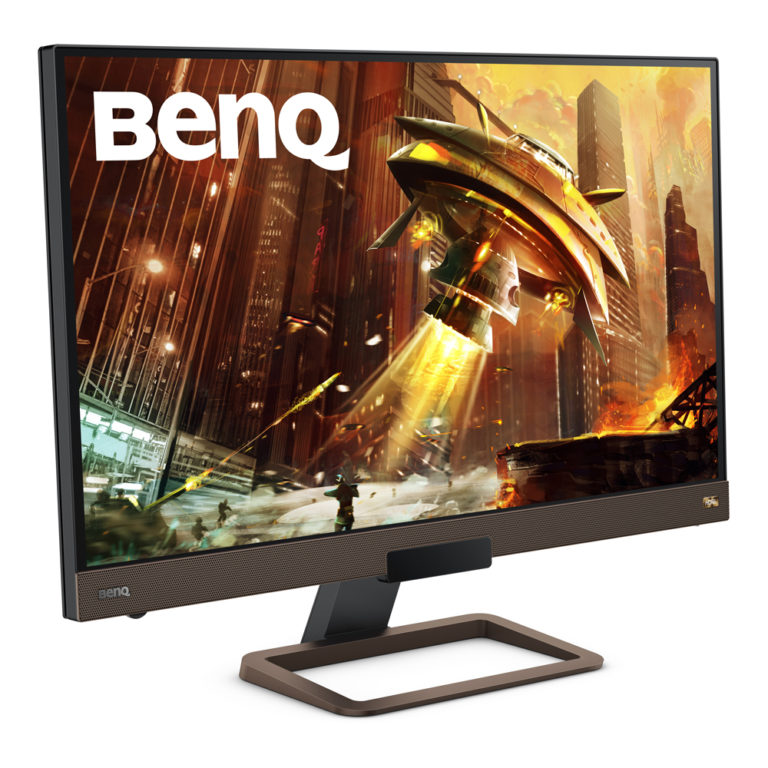
 Usually, when brands tackle gaming monitor, most of them tend to focus on the visual aspect of it – making sure they good picture quality and higher frame rates. For most consumers, that’s enough since it is mostly a visual experience with monitors. However, BenQ aims to deliver an audio-visual package with the EX2780Q, offering an all-in-one media consumption monitor with speakers to match the display quality.
Design

The EX2780Q sports a black matte chassis that’s accented by copper grills on the bottom bezel and the base – it honestly looks like something you’d find in an office space rather than attached to a gaming rig. But since ‘Gamer-Edgy’ went out of style 5 years ago, it’s a refreshing take on a high-end gaming monitor and diverts from brands that still stick to the “gamer” aesthetics. BenQ went with a look that everyone can certainly appreciate. The build quality overall is excellent, no clanky creaking like monitors made from cheaper plastic. Other than that, the monitor has near bezel-less on three sides with the bottom being thicker for where the built-in speakers are. On the back right side, there are buttons and navigation joystick for the settings, and on the left side of the bottom beze, you’ll find an adjustment wheel for speaker volume.
Setting adjustment buttons on the chassis is a sure thing for monitors. What isn’t is the EX2780Q’s own dedicated remote control which gives you access to the monitor’s same array of settings. It particularly to have when you’re sitting at a distance away from the monitor and you don’t have to get up to adjust the volume – yes, the remote has volume control. Although, the setting menu interface and text is small and can be difficult to read from afar. But the remote control has dedicated buttons for three of its features, which I will segue into now!
Remote Control Features:

The EX2780Q has some smart features that will enhance your gaming and viewing pleasure. The first being the Brightness Intelligence Plus (B.I.+) feature which allows the monitor to intelligently adjust the brightness of the monitor for more comfortable viewing. This is achieved through the sensors found under the bottom bezel that detects the ambient light of its surroundings. Initially when testing the remote control and going through the settings, I was manually adjusting the monitor like schmuck. Then I found the B.I. setting that turns it into a set-it-and-forget-it scenario because I don’t have to be concerned about the constantly changing ambient light.

The next feature is BenQ’s proprietary HDRi technology that offers intelligent on-screen adjustments under three modes – Cinema HDRi, Display HDRi and Game HDRi. They’re both made to intelligently adjust clarity for clear and realistic details in the dark areas, but are subtly different depending on the content you’re viewing. Cinema HDRi enhances contrast and the color performance so as to prevent washed-out images, while Game HDRi enhance the contrast to the details in the darker scenes and also the color gradations so as to avoid overexposure.
The third feature on which the remote has a dedicated button for is the Low Blue Light mode. If absorbing excessive amounts of blue light isn’t your thing (it shouldn’t), then you’ll be glad to know that the EX2780Q has a Low Blue Light mode, and it has several presets for Web Surfing, Office, Reading, ePaper and Multimedia. At this point, this mode isn’t hard to find these days, but for this monitor, it pairs really well with the B.I. Plus on.
One final major feature of the EX2780Q is its 2.1 channel built-in speakers that are calibrated by treVolo and with the monitor, again comes with several presets: Live/Pop, Cinema, Dialog/Vocal, Game, and Rock/Party.
Display and Performance

The BenQ EX2780Q features a 27-inch 2560 x 1440 resolution QHD display with a 144Hz refresh rate and 5ms response time. The higher resolution is a welcome upgrade from 1080p and is likely the next standard for gaming monitors. The 144Hz refresh rate is of course great for fast-paced games – I first tried it with Doom (2016) and getting that frame rate at that resolution truly did show off the Doom Slayer at his peak. The monitor also supports FreeSync for those who has AMD GPUs. Plus, with the Game HDRi turned on, I was surprised how much better it is to play with – the details really show in the shadows, and for those who knows, Doom has a lot of that.
Next, for a change of pace, I switched over to The Witcher 3 – yes, it is because of the Netflix series. The Witcher 3 is a gorgeous game and the Game HDRi really takes it up a notch, showing off the game’s scenic landscapes way better than with the feature off. The same praises can be said for the Cinema HDRi – whatever it is that I’m watching just pops more.

This HDRi feature is definitely the highlight of the EX2780Q. Since the HDR effect is intelligently emulated, it makes every sort of content on screen HDR, and it does an amazing at it. Now for the audio aspect of the monitor, its implementation is one of the best I’ve tried in a monitor. You’ll definitely find a preset that fits your content, be it gaming, music or movies.
Final Verdict
BenQ aimed to deliver the full audio visual experience and their EX2780Q certainly does just that. It might be marketed as a gaming monitor but I dare to say that it stands as a great all-in-one monitor. Given that it’s priced at RM1,799, the EX2780Q can be your main workhorse monitor for years to come.
For more information, check out the links here!





