Nokia smartphones are like a myth to me. The last one I used as my primary communications device had been from a Taiwanese brand that uses the HD moniker for is product name. The slew of Lumia devices that appeared after seemed unreal for me as I never got the chance to ever try one of these devices. That all changed when Nokia decided to bestow on me its newest Lumia 630, which comes packed with Windows Phone 8.1. Cue my gleeful howl of joy!
Fits Nicely
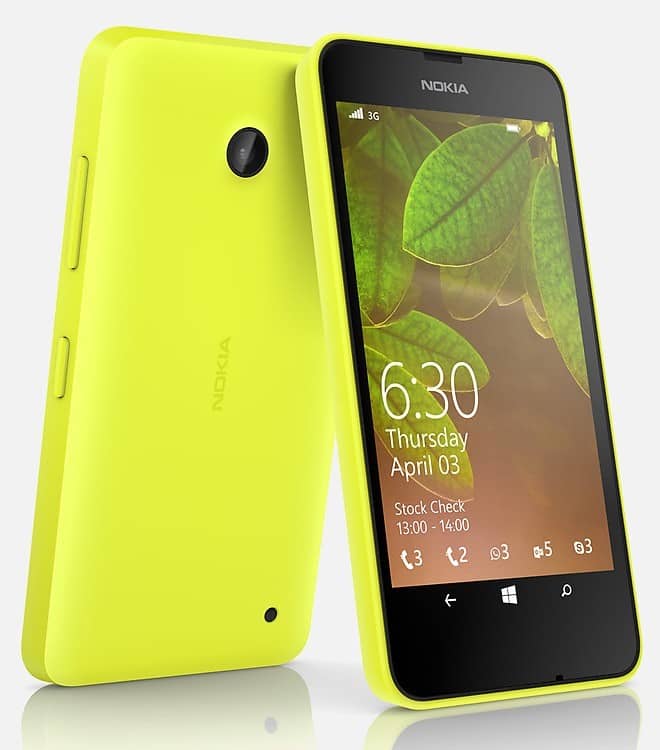
The Lumia 630 is a decently sized candy-bar that I can easily hold in my hand and control/manage without any issues. Swiping around the screen and launching the apps I want are easy enough and can be done with one-hand even. I like how the rocker buttons, both power and volume controls, are within reach and do not require me to do any yoga-like moves with my thumb.
Cool Customisation
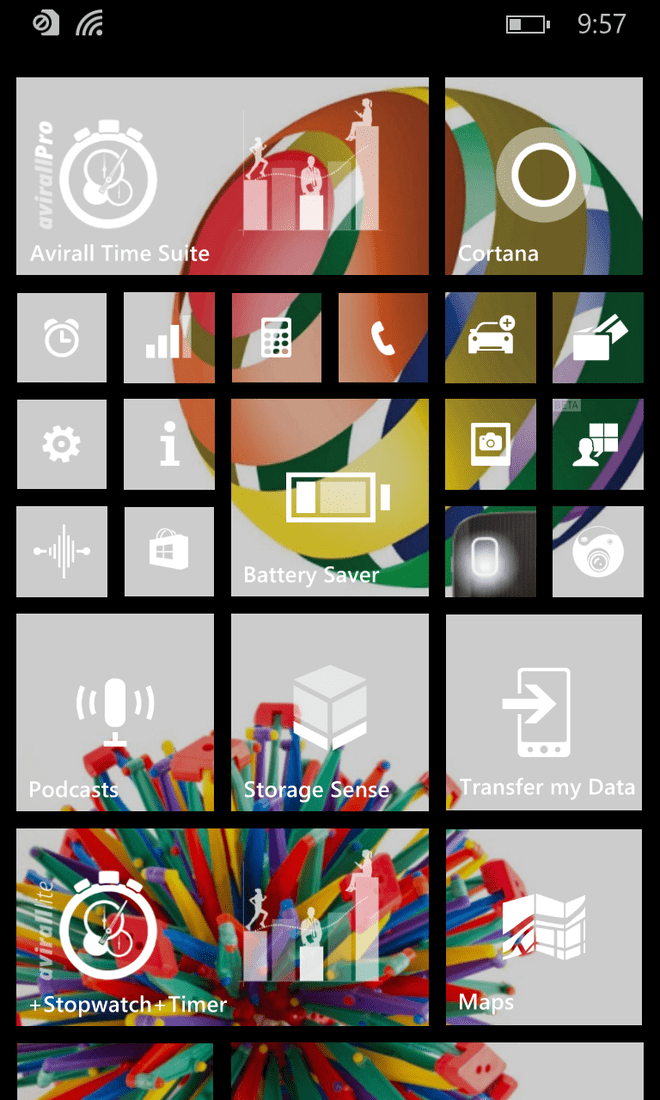
Having used Windows Phone 7.5 before, I figured it’d be easy to jump in. With the Windows Phone 8.1 interface, it certainly felt familiar enough. However, the ‘Home Screen’ and Apps area is where the similarities end. The Modern UI that the new operating system sports is choke full of user customisation that thoroughly left me wanting for more. The so called ‘Transparent Live Tiles’ lets me see the background image I have selected to go on display. When paired with the ability to re-size (now with another option to go even larger), re-colour, and move around the tiles based on how I want it to look, I can create my own theme with the image I chose to feature as my wallpaper. Personally, that is so cool!
Quick Operation
When using the Lumia 630, it is clear the device is built to offer a smooth performance. Swiping between the homescreen and apps zone is super breezy and easy. Like its predecessor, that is all it took to operate the device. Of course, like the members of its family range, executing apps and user tasks are quick and encountered no lag. Even when I have multiple apps running in the background, there are no slowdowns whatsoever. It’s a nice touch that this version of Windows Phone also comes with a new gesture-typing system called Word Flow. I’ve not made any typos since I started using it.
Thoughts of Conversion
As I used the Lumia 630, I have become a total convert to the Microsoft cause. Not only did it offer what I needed in the most for my office productivity – Microsoft Office, which is embedded; it also has the usual bundle of stuff that I am mostly tied for mobile services like social media apps; a great camera app, and, most importantly, a super accurate GPS system (aka HERE Drive). There is even a quick information hub that Microsoft calls the Action Centre. What else would I need really? Not much if I look back at the stuff I do now on my smartphone. This, more or less, makes the Lumia 630 the perfect mobile device for my everyday needs.
Price: RM549
Dimensions (L x W x D): 129.5 x 66.7 x 9.2mm
Weight: 134g
Display: 4.5in FWVGA (854 x 480) 16:9 TrueColour (24-bit/16M) IPS LCD with ClearBlack
Pixel Density: 221ppi
Touchscreen: Capacitive Multippoint-Touch
SIM: Dual, micro-SIM
CPU: Qualcomm Snapdragon 400 Quad-Core 1.2GHz
RAM: 512GB
Storage: 8GB with expandable memory (up to 128GB), free 7GB OneDrive Cloud storage
I/O Ports: microUSB 2.0, 3.5mm audio jack
Connectivity: Wi-Fi IEEE 802.11 b/g/n, Bluetooth 4.0 (A2DP 1.2)
Data Network: WCDMA 900/2100MHz, GSM 850/900/1800/1900MHz
Camera: 5MP Auto-focus with 4x Optical Zoom
Battery: 1830mAh
Value: 10/10
Features: 8/10
Performance: 9/10
Design: 9/10
Usability: 9/10
Verdict: Small yet versatile, the Lumia 630 is a great all-rounder smartphone.
Total Score: 9/10